

1 WeiCity Shop Features: From Product Display to Online Ordering
Present product images, prices, and specifications together, making it easier for customers to move from learning about a product to choosing and ordering it
WeiCity Shop connects product display with online selection, allowing merchants to organize product images, prices, descriptions, and specifications, while letting customers, after browsing, further select products, add them to the shopping cart, and submit orders. This article introduces the basic purpose of the Shop, along with information merchants should pay attention to when publishing products and information customers should note when buying.
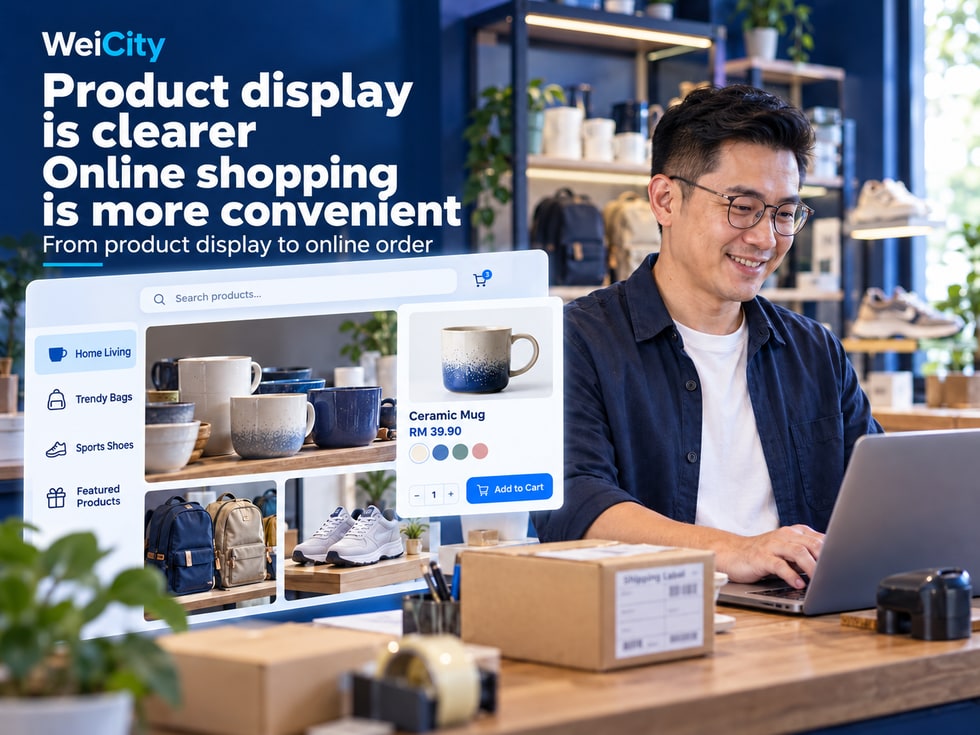
When customers see a product they like, they usually do not decide to buy based on just one photo.
They may also want to know:
💰 How much does the product cost?
🎨 What colors and styles are available?
📏 Does the size suit me?
📦 What does the product include?
🛒 How do I add items to the cart?
💳 How do I place an order and pay?
If this information is scattered across different social media posts, albums and chat history, customers may need to keep asking, and merchants may need to repeatedly send product photos, quotes and specification details.
WeiCity Shop (WeiCity Shop) helps merchants centralize product information, so customers can learn about products on product pages, choose specifications, and continue ordering according to the purchasing features currently available.
For retail merchants, the Shop is not only a place to display product images, but also an important tool for organizing product information and reducing repeated inquiries.
🏪 Merchant channel: Helps customers get to know your brand and business.
🛍️ Shop: Centralizes products available for purchase.
📦 Product details: Explain price, specifications, features and purchase conditions.
🎨 Specification selection: Helps customers distinguish between different styles.
🛒 Cart: Lets customers organize products they plan to buy.
💳 Orders and payment: Complete the corresponding purchase process according to the current features.
Specific product features, cart, orders and payment methods are subject to WeiCity's current Shop pages, merchant settings and enabled services.
The WeiCity merchant channel and the Shop can serve different purposes.
The merchant channel mainly helps customers get to know the merchant.
The Shop further helps customers learn about specific products, and how to choose and buy them.
Customers can learn about:
🏷️ Merchant name.
📝 Brand introduction.
📍 Business area.
🕒 Opening hours.
💬 Contact Information.
Customers can view based on the features that are actually available:
📦 Product names.
🖼️ Product photos.
💰 Product prices.
🎨 Colors and styles.
📏 Sizes and specifications.
📝 Product introduction.
🛒 Purchase entry.
For example, a clothing shop receives similar questions every day:
"How much is this piece of clothing?"
"Is it also available in black?"
"Do you have XL?"
"Can I see a photo of the back?"
"How do I buy it?"
If the merchant has to resend photos and descriptions every time, repetitive communication increases the workload.
With a clear product page, customers can first review the main information on their own, then contact the merchant about any questions that remain unanswered.
📌 The main value of the WeiCity Shop is that it keeps product information more centralized, making it easier for customers to understand and choose.
The product page is an important place for customers to learn about a product.
A complete product introduction should answer the most common questions customers have before buying.
The name should be specific and easy to understand.
For example:
❌ New cup.
✅ 500ml stainless steel insulated cup.
❌ Fashionable top.
✅ Men's 100% cotton crew-neck short-sleeve top.
A clear name helps customers quickly identify the product.
Recommended to show:
📸 Front appearance.
🔍 Important details.
🎨 Different colors.
📦 Package contents.
🏠 Usage scenarios.
Images should match the actual product as closely as possible to avoid misunderstandings.
Prices should clearly indicate the corresponding product content.
For example:
💰 Single item price.
📦 Set price.
🎨 Prices for different specifications.
➕ Additional option fees.
If the price varies by specification, it should be clearly distinguished based on the current product settings.
You may specify:
📋 Main uses.
🛠️ Materials.
📏 Dimensions.
🎯 Suitable scenarios.
⚠️ Usage notes.
For example:
📦 What each item includes.
🔢 Quantity per package.
🚚 Delivery Arrangements.
🏪 Self-pickup method.
📅 Whether advance ordering is required.
Product name: 500ml stainless steel insulated cup
📦 Capacity: 500ml.
🛠️ Material: fill in according to actual product information.
🎨 Color: black, white, blue.
🖼️ Images: show the cup body, lid, and actual packaging.
💰 Price: fill in according to the current selling price.
📝 Description: introduce usage methods, cleaning requirements, and related precautions.
The above is only a product information example; specifications should be based on the actual product.
📌 The clearer the product information, the easier it is for customers to judge whether a product meets their needs.
When shopping online, customers cannot pick up a product and examine it as they would in a physical store.
Therefore, images should not only be clear but also help customers understand the actual product.
Let customers see at a glance what the product is.
For example:
👕 Overall appearance of the clothing.
☕ Overall design of the insulated cup.
👜 Front of the handbag.
For example:
🧵 Clothing fabric.
🔒 Backpack zipper.
🛠️ Product ports/interfaces.
📦 Package contents.
If a product comes in different colors, images can help customers compare them.
For example:
⚫ Black.
⚪ White.
🔵 Blue.
For example:
📐 Product length, width, and height.
👕 Clothing size chart.
☕ Cup capacity.
🛋️ Furniture dimensions.
For example:
🛋️ Furniture placed in the living room.
🎒 Backpack in everyday use.
💐 Bouquet shown as a gift.
❌ Blurry images.
❌ Products that are heavily cropped.
❌ Photos that do not match the actual style.
❌ Misleading images for different specifications.
❌ Images containing incorrect prices or outdated information.
📌 Multi-angle images can be supplemented with text descriptions to help customers better understand the product's appearance and details.
The same product may come with several different options.
For example:
👕 Clothing: color and size.
👟 Shoes: color and shoe size.
☕ Insulated cup: capacity and color.
👜 Tote bag: size and style.
🛋️ Furniture: material and color scheme.
If options are not clearly distinguished, customers may only say:
"I want the blue one."
But the merchant may not know which size the customer needs.
Product: Stainless Steel Insulated Cup
🎨 Color: black, white, blue.
📏 Capacity: 350ml, 500ml, 750ml.
Customers can choose the combination they need based on the specification options that are actually available.
For example:
🔵 Blue + 500ml
This kind of selection is clearer than simply writing "blue cup."
✅ Whether the specification names are correct.
✅ Whether colors match the images.
✅ Whether each capacity corresponds to the correct price.
✅ Whether unavailable combinations have been updated.
✅ Whether customers can easily understand the options.
If the Shop supports SKU management, different specification combinations can correspond to different codes according to the actual rules.
For example:
CUP-BLU-500
This can serve as an internal code example for a blue 500ml thermos bottle.
This is only an example and not a fixed WeiCity coding format.
📌 Clear product specifications help customers express their needs accurately and make it easier for merchants to verify orders.
When customers find a product they like, they can continue using the purchase entry currently provided by the Shop.
The role of the shopping cart is to help customers organize the products they plan to buy and review them again before submitting an order.
Customers first review:
📦 Product names.
🖼️ Product images.
💰 Product prices.
📝 Product introduction.
For example:
👕 Colour.
📏 Dimensions.
☕ Capacity.
🎁 Style.
For example:
1 top.
2 insulated cups.
3 gift sets.
If the current product supports cart purchases, customers can add the items they need to the cart.
They can then continue browsing other products.
Customers can check the following based on the information provided on the page:
📦 Product names.
🎨 Specifications.
🔢 Quantity.
💰 Prices.
Confirm the order and payment arrangements according to the checkout process actually provided by the Shop.
For example, a customer wants to buy:
👕 One top.
👖 One pair of trousers.
🎒 One backpack.
The cart helps customers review the items they have already selected in one place, instead of relying entirely on chat history to organize a purchase list.
📌 The cart gives customers a chance to check the products and quantities they have chosen before submitting an order.
After selecting products, customers may still need to submit the order and complete payment.
These two steps should be confirmed separately.
Submitting an order usually involves confirming purchase information.
For example:
📦 Product names.
🎨 Product specifications.
🔢 Quantity.
💰 Order amount.
🚚 Delivery method.
📍 Necessary receiving information.
Payment means completing the corresponding payment operation according to the payment methods currently provided by the Shop.
Merchants need to confirm the transaction based on the actual order and payment status.
A merchant should not assume that funds have been successfully received simply because a customer sent a payment screenshot.
✅ Whether the products are correct.
✅ Whether the specifications are correct.
✅ Whether the quantity is correct.
✅ Whether the product amount is accurate.
✅ Whether any other applicable fees apply.
✅ Whether the delivery or pickup arrangements are clear.
For example:
📋 Whether the order was successfully created.
💳 What the payment status is.
📦 Whether the products are waiting to be processed.
🚚 How subsequent delivery will be arranged.
Different merchants may use different payment and order processing settings.
Whether specific payment channels, automatic confirmation, refunds, or other features are supported should be determined by the services currently enabled.
📌 Clearly distinguishing order status from payment status can reduce misunderstandings during a transaction.
The merchant channel and the Shop can work together, but they focus on different things.
Mainly helps customers learn about:
🏷️ Merchant name.
📝 Brand introduction.
📍 Business location.
🕒 Opening hours.
📚 Article content.
🖼️ Works and environment.
💬 Contact Information.
Mainly helps customers view:
📦 Products.
💰 Prices.
🎨 Specifications.
📏 Dimensions.
🛒 Shopping cart.
📋 Orders.
Step 1: Get to know the merchant
Learn about the brand and main business through the merchant channel.
Step 2: View products
Enter the currently available Shop or product entry.
Step 3: Compare and choose
Review different styles, prices, and specifications.
Step 4: Complete Your Purchase
Select products and submit your order by following the process provided on the product page.
If the product page provides a publicly accessible link, merchants can share specific products based on customer needs.
For example:
“This page shows the colors, capacities, and prices of the thermos. You can first check the styles that suit you.”
Because customers may already know what they want to buy.
In this case, sharing the corresponding product page directly is usually more convenient for them to find information.
📌 The Merchant Channel helps customers get to know the brand, while the Shop helps customers further understand and choose products.
Different merchants can organize their products based on the actual product types they offer.
Recommended to show:
👕 Product style.
🎨 Color.
📏 Dimensions.
🧵 Material.
💰 Prices.
Recommended to show:
📦 Product Categories.
📏 Capacity or size.
🎨 Color.
🛠️ Materials.
📋 Usage instructions.
Recommended to show:
🔧 Tool name.
🏷️ Model.
📏 Specifications.
📦 Package quantity.
📝 Intended use.
Recommended to show:
💐 Bouquet styles.
🎨 Color and style.
💰 Prices.
📅 Reservation requirements.
🚚 Delivery or self-pickup arrangements.
Recommended to show:
🎁 Gift contents.
📦 Set combinations.
🎨 Packaging options.
📅 Ordering arrangements.
💬 Custom order inquiries.
Recommended to show:
🛋️ Product type.
📏 Dimensions.
🎨 Materials and colors.
🏠 Usage scenarios.
🚚 Delivery conditions.
📌 Different industries can use the same approach to presenting products, but product information should be adjusted according to the actual business.
Many customers browse products on their mobile phones.
Therefore, product pages should not only contain complete information but also be easy to read.
Customers should be able to identify the product quickly.
For example:
“500ml Stainless Steel Thermos”
They are easier to understand than titles containing many unrelated promotional words.
If different specifications have different prices, check that the page displays the correct information.
For example:
Black / 500ml.
Blue / 750ml.
You can follow this order:
📦 Product features.
📏 Specification details.
🛠️ Materials and uses.
📋 Package contents.
🚚 Purchase arrangements.
Check that the purchase button, shopping cart, or other action entry currently provided on the page works properly.
It is recommended to check from the customer's perspective:
👀 Can the customer understand the product?
🎨 Can the customer select the required specification?
🔢 Can the customer confirm the quantity?
🛒 Can the customer add the item to the cart using the current features?
📋 Can the customer review the order?
📌 Product pages should let customers easily understand and choose products, and clearly know what to do next.
Listing a product does not mean its information can remain unchanged over time.
In actual business, products may change in different ways.
For example:
The original selling price was RM39.
It was later adjusted to RM45.
The product page should be updated promptly.
For example:
Originally there were only black and white.
Blue was later added.
Options can be added according to the actual product settings.
For example:
A certain size has sold out.
Supply information should be updated according to the current inventory management method.
For example:
The product packaging has changed.
New actual photos can be added.
For example:
Materials, package contents, or usage requirements have changed.
The related descriptions should be updated.
For example:
Delivery coverage has been adjusted.
The self-pickup location has changed.
The booking time has changed.
📦 Product names.
💰 Current price.
🎨 Specifications.
📊 Inventory.
🖼️ Images.
🚚 Delivery instructions.
🔗 Share links.
📌 Keeping product information accurate allows customers to make suitable purchase decisions based on current information.
Product pages should first help customers understand the products.
On this basis, clear product names and descriptions also help organize the page's topic.
For example:
“500ml Stainless Steel Thermos”
Compare:
“Best-Value New Hot Item”
explains what the product is more clearly.
For example:
📏 Capacity.
🎨 Color.
🛠️ Materials.
📦 Package contents.
Use clear, genuine product images whenever possible.
For example:
“How to Choose Thermos Capacity? Reference Guide for 350ml, 500ml, and 750ml”
If the current editor supports it, you can link products with related buying guide articles.
Whether a product page can be crawled, indexed, or displayed by search engines also depends on platform technical settings, page accessibility, content quality, and other factors.
📌 Product information should first be genuine, accurate, and complete before further search content optimization is considered.
The WeiCity Shop is a functional area used to display and organize product information and, based on the features currently available, provide selection and ordering processes.
The Merchant Channel mainly introduces the brand and business.
The Shop mainly displays specific products and purchase information.
Based on the actual editing features available, product names, images, prices, specifications, and descriptions can be displayed.
If the current product type supports specification options, you can set them according to the actual product.
Support for the cart and related actions depends on the current Shop features and product settings.
This should be confirmed based on the current cart and checkout process.
Not necessarily.
This should be confirmed based on the actual payment status.
Verify through the current order, payment records, or the actual payment channel, rather than relying only on payment screenshots.
The specific editing method depends on the current merchant management page.
This depends on the number of images and display method supported by the current product editing page.
Update the product status or related descriptions promptly, based on the current inventory features and actual supply situation.
If the product page provides an accessible sharing link, it can be shared according to customer needs.
Not necessarily.
Payment methods and transaction capabilities should be confirmed based on the services currently enabled.
Not necessarily.
Clear categories, complete information, and ongoing maintenance are more important than simply adding more products.
Accurate product names and descriptions help organize page content, but they do not guarantee Google indexing or ranking.
📌 The focus of the WeiCity Shop is to help customers clearly understand products and continue the selection process based on the actual features available.
✅ Product names are clear.
✅ Product description is complete.
✅ Package contents are accurate.
✅ Images are clear.
✅ Appearance matches the actual product.
✅ Important details are complete.
✅ Current prices are correct.
✅ Prices for different specifications are clear.
✅ Purchase unit is clear.
✅ Colors are correct.
✅ Sizes are complete.
✅ Styles are easy to distinguish.
✅ Current stock or supply status is accurate.
✅ Specifications that are unavailable have been updated.
✅ Product selection works normally.
✅ Quantities can be confirmed correctly.
✅ Currently available purchase entries work properly.
✅ Actual payment methods have been confirmed.
✅ Order details are correct.
✅ Merchant understands the order handling process.
✅ Delivery or self-pickup instructions are clear.
✅ Applicable fees are accurate.
✅ Booking conditions are clear.
✅ Images are complete.
✅ Text is easy to read.
✅ Specification selection is clear.
✅ The purchase entry is easy to find.
📌 After publishing, it is recommended to review the entire page once on a mobile phone from the customer's perspective.
An online shop is more than a collection of product images.
Customers also need to understand prices, specifications, styles, supply status, and how to purchase.
Merchants also need to keep product information accurate to reduce repetitive communication.
🏪 Merchant Channel: Let customers get to know your business.
🛍️ Shop: Centralizes products available for purchase.
📦 Product Details: Explain product features and purchase requirements.
🖼️ Multiple Images: Help customers see the appearance and details.
🎨 Variant Selection: Help customers choose the right color, size, and style.
🛒 Shopping Cart: Makes it easy to organize products you plan to buy.
💳 Orders and Payment: Complete the corresponding transaction process based on the current features.
🔄 Ongoing Updates: Keep prices, specifications, and supply information accurate.
The value of WeiCity Shop is that it connects product display, variant selection, and the purchase process, giving customers a clearer path from learning about a product to placing an order.
Customers do not have to rely only on scattered photos and chat messages to understand a product.
Merchants can also reduce the work of repeatedly sending the same information through complete product details.
🛍️ Product information is centralized, making it easier for customers to understand.
🎨 Clear variant selection makes it more convenient for customers to shop.
🛒 A clear purchase process lets customers know what to do next.
Start with clear product images and descriptions, then gradually improve variants, prices, inventory, and purchase arrangements to make your online product display more organized.
Specific product variants, shopping cart, checkout, orders, payment, and other features are subject to WeiCity's current Shop pages, merchant settings, and activated services.
👉 Open WeiCity: https://wei.city/