

6 Add Links and Product Cards to Articles: Connect Readers to Next Steps
From content introductions to viewing products, learning about services, and submitting inquiries, help readers clearly see what they can do next after reading.
Articles can answer questions and also guide readers to explore related products and services. Placing links and product cards thoughtfully in WeiCity articles can connect usage instructions, buying advice, and brand stories to relevant pages. This article introduces the best use cases, placement, and copywriting for both, helping merchants build a clear and natural reading path.
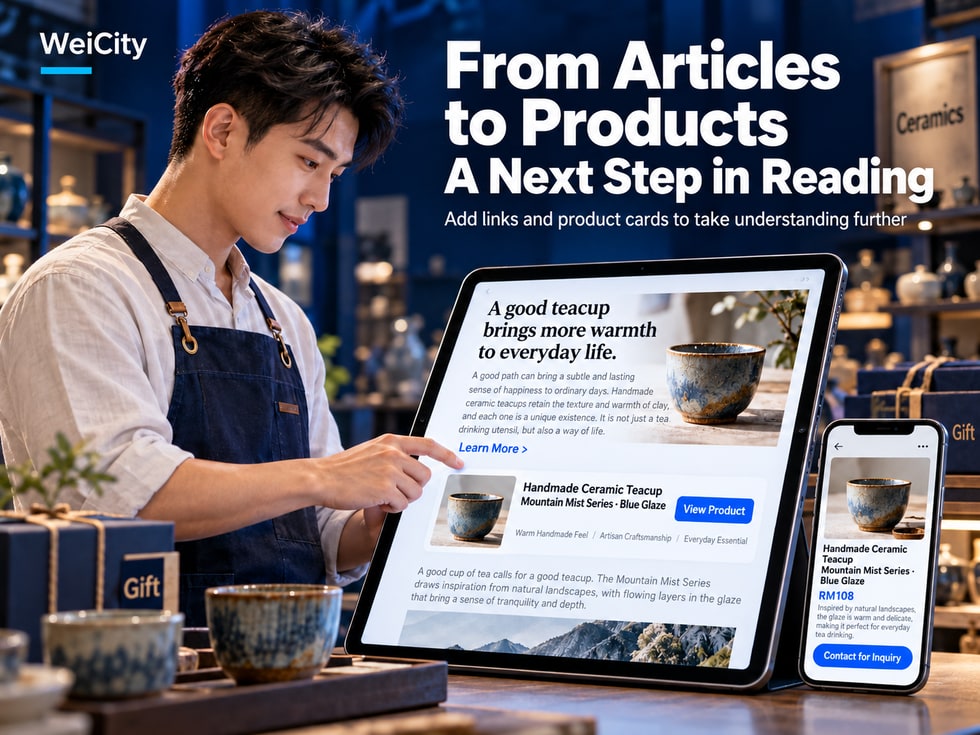
When readers open an article, they usually want to find answers, learn about products, or judge whether a service suits their needs.
For example:
🎁 After reading a holiday gift guide, they want to view the gift boxes the article introduces.
☕ After watching a coffee brewing tutorial, they want to learn about the coffee beans used.
🏡 After reading a furniture buying guide, they want to view suitable storage cabinets.
🛠️ After reading a repair service introduction, they want to learn more about how to book.
🎓 After reading a course introduction, they want to view the related course content.
If an article contains only text and no clear next step, customers may have to search again for the product or service page.
Links and product cards in WeiCity articles can connect the content introduction with related products, services, or other pages, based on the editing features actually available.
The article explains the purpose of products and services.
Links guide readers to view related information.
Product cards allow products mentioned in the article to be presented more visually to readers.
By arranging these elements well, merchants can help customers move naturally from reading an article to further learning, comparing, inquiring, or purchasing.
This article introduces the difference between regular links and product cards, suitable use cases, placement, link text writing, and items to check before publishing.
An article can help customers understand a problem, but after reading, they may want to take further action.
For example:
📝 The article explains how to choose a birthday cake.
🎂 The customer wants to view different cake styles.
🛍️ The article explains how to choose an office desk.
🏡 The customer wants to compare products of different sizes.
📚 The article introduces photography preparation.
📸 The customer wants to learn about related photography services.
If an article provides a matching entry point, customers do not need to search again for related pages.
Introduction:
the purpose of products.
service features.
selection methods.
usage scenarios.
Precautions.
For example:
service details.
related tutorials.
Product pages.
Merchant channel.
inquiry entry points.
If the current editor supports product cards, you can display related products in the article according to the actual feature.
Readers can decide whether to open the related pages according to their needs.
A bakery publishes:
🎁 How to choose a suitable gift box for holiday gifting?
The article first introduces:
🎯 Who the gift is for.
💰 Budget range.
🍪 What's in the gift box.
📦 Packaging method.
📅 Ordering arrangements.
Gift box products can be linked later, depending on the actual features available.
📌 The article first helps customers understand their needs, then offers next steps through relevant entry points. This is more helpful than simply repeating product displays.
Both regular links and product cards can connect to related content, but they are presented differently and serve different purposes.
Usually uses a line of text to take readers to a specified page.
For example:
“View the full booking guide”
“Check product specifications”
“Browse related works”
If the editor supports it, a product card is usually used to display a product and its related information.
The specific fields it may include, such as product image, name, price, or a view button, should be confirmed against WeiCity's current actual features.
When readers need to view another article, a service description, or other related pages.
When the article is introducing a specific product and you want readers to view that product more directly.
An article introduces:
☕ How to choose coffee beans suitable for pour-over coffee?
You can use:
📚 Regular link: read about how to store coffee beans.
🛍️ Product card: displays the coffee beans introduced in the article.
Regular links suit connecting to information, while product cards suit displaying specific products.
The two can work together according to the article's content.
Regular links are not limited to products.
For merchants, many different types of content can be connected through links.
For example:
“View the scope of in-home cleaning services”
Suitable for linking to a more complete service description.
For example:
“Read the furniture measurement guide”
Suitable for providing further reading.
For example:
“Learn about the size and materials of this storage cabinet”
Suitable for linking to a specific product page.
For example:
“Browse more interior design cases”
Suitable for showcasing related works.
For example:
“View what to prepare for a photography service booking”
Suitable for helping customers understand the booking process.
For example:
“Contact the merchant to ask about service arrangements”
Should link to a valid, working contact method.
For example:
“View merchant introduction and business information”
Suitable for helping readers learn more about the merchant.
For example:
“Learn about this promotion's details and eligibility”
Suitable for linking to promotion information that is still valid.
If an article is explaining how to maintain a product but suddenly inserts many unrelated links, it may hurt the reading experience.
📌 Every link should have a clear purpose, so customers know why it is worth checking out.
When an article introduces specific products, a product card can serve as an entry point to related products.
However, product cards should not be inserted just to increase the number of products shown.
It is best for the products to relate directly to the article's topic.
For example:
☕ What tools are needed for pour-over coffee?
The article introduces:
Coffee beans.
Dripper.
Filter paper.
Pour-over kettle.
If a matching product is available, related product cards can be displayed according to the actual features.
For example:
🎁 How to choose a birthday gift? Gift suggestions for different budgets
Suitable gift boxes can be displayed in the relevant paragraph.
For example:
🏡 How to choose a suitable storage cabinet for a small living room?
The storage cabinet introduced in the article can be displayed.
For example:
🛍️ What are the design features of the new office desk?
The article first explains the product's features, then provides an entry point to view the product.
For example:
📏 Which usage scenarios suit storage boxes of different sizes?
Products of different specifications can be linked according to the actual features.
For example:
🏡 How to set up a simple and comfortable home workspace?
You can introduce:
Office desks.
Storage products.
Desk lamps.
Suggested content:
the purpose of products.
Intended readers.
Key features.
Reasons for choosing it.
Specifications to pay attention to.
Customers may still need to know the size, materials, suitable conditions, and other details.
📌 The product card provides an entry point to view the product; the article helps customers understand why this product may suit them.
Link text should state the destination content directly.
Avoid making customers guess.
Click here.
See more.
Go now.
More content.
Without context, these phrases may leave readers unsure where the link leads.
📄 View the full service introduction.
🛍️ Learn about the contents and specifications of this gift box.
📚 Read how to store coffee beans.
📅 View the booking preparation guide.
🖼️ Browse more renovation cases.
💬 Contact the merchant to ask about course schedules.
For example:
“View product dimensions”
There is no need to make an entire paragraph a link.
If the link says “View prices”, the destination page should contain relevant price information.
Do not make link text too long.
Clear link names also help readers who use assistive reading tools understand the link's purpose.
The article introduces photography services.
It is not recommended to only write:
“Click here.”
You can write:
📸 View photography services and booking information.
📌 Good link text lets readers know what information the next page will provide before they click.
Different versions of the rich text editor may use different steps.
The following are common link setup steps; refer to the current WeiCity editing page for specifics.
For example:
“View the full booking guide”
In the article body, select the text you want to link.
If the editor provides a link button, use it according to the actual interface.
For example:
The related product page.
The service introduction page.
Another article.
Save in the way the editor actually provides.
Confirm the text is correctly linked to the target page.
Open the published article and actually click the link.
If the link was not set successfully, check the following:
Whether the text was selected correctly.
Whether the URL is complete.
Whether the link was saved successfully.
Whether the editor supports this type of link.
📌 After setting up a link, it is best to click it to test it, rather than only checking whether the text has changed color.
If the WeiCity article editor currently offers a product card feature, you can add related products to the article according to the actual steps.
Because the button location, selection method, and display fields of product cards may change between versions, the following explains the general approach.
For example:
🎁 How to choose a holiday gift box?
Choose products that are truly related to the article's content.
For example:
After introducing the gift box contents.
After describing the suitable recipients.
In a product comparison section.
If the editor provides a product insertion entry, select related products according to the current page.
Check that the correct products were selected.
Confirm the product card displays correctly in the article.
Please pay special attention to:
Product images.
Product name.
Price information.
View entry.
Do not assume a product card supports:
Direct payment.
Add to cart.
Stock display.
Product variant selection.
Automatic discount application.
Whether these features are available should be confirmed based on the current product page and the features actually available to your account.
📌 Product cards should help customers view related products, rather than turning the article into a pile of unexplained products.
Placement affects the reading experience.
If a large number of product cards appear at the very beginning of an article, customers may be asked to view products before they have understood the content.
If all links are placed at the end of the article, readers may need to keep scrolling to find them.
It is recommended to arrange them according to the content.
For example:
How do you choose a suitable festive gift box?
For example:
The gift recipient.
Budget.
The gift box contents.
How to store it.
Explain product features and the situations they suit.
If the current feature supports it, corresponding products can be displayed.
For example:
How to store the gift box.
Ordering preparation guide.
For example:
“To learn more about the contents of the gift box, you can view the related product details.”
You can add entry points relevant to each section in different chapters.
For example:
After introducing Product A, link to Product A.
After introducing Product B, link to Product B.
Too much repetition may interfere with reading.
📌 Answer the question first, then provide relevant entry points, so customers can continue browsing according to their own process of understanding.
A call to action is commonly called a CTA.
Its purpose is to tell readers what next step they can take.
For example:
View products.
Read the guide.
Browse the Gallery.
Contact the merchant.
Suitable for:
“To learn more about related methods, you can read the complete how-to guide.”
Suitable for:
“If this product suits your needs, you can view the detailed specifications and purchase arrangements.”
Suitable for:
“To check whether the service suits your situation, you can first review the service scope and then contact the merchant for advice.”
Suitable for:
“To learn more about design styles, you can browse the related portfolio Gallery.”
Suitable for:
“To learn more about course content and schedules, you can view the course details.”
Suitable for:
“To see the dishes currently offered, you can view the merchant's online menu.”
Clearly state the next step.
Relate to the article's topic.
Avoid excessive pressure to act.
Do not promise features or services that do not exist.
For example:
If a product has no limited-time offer, do not write "last-minute deal".
If a service requires manual confirmation, do not write "guaranteed booking success now".
📌 A good call to action helps readers know what they can do next, rather than creating unnecessary pressure.
Article:
🎁 How do you choose a cake suitable for a birthday party?
You can link to:
🎂 Cake products.
📷 Cake portfolio Gallery.
📅 Custom order preparation guide.
Article:
👕 How do you choose the right clothing size for yourself?
You can link to:
🛍️ Related products.
📏 Size information.
📦 Pickup and delivery guide.
Article:
🏡 How do you choose storage furniture for a small space?
You can link to:
📦 Storage cabinet products.
📏 Measurement guide.
🛠️ Installation instructions.
Article:
☕ What do you need to prepare for pour-over coffee?
You can link to:
☕ Coffee beans.
🛍️ Brewing equipment.
📚 Storage methods.
Article:
📸 What do you need to prepare for your first personal portrait photo shoot?
You can link to:
🖼️ Photographic works.
📋 Service introductions.
📅 Booking guide.
Article:
🔧 What information do you need to prepare before repairing a home appliance?
You can link to:
🛠️ Service scope.
📋 Fault description guide.
💬 Contact entry point.
Article:
🎓 How do you choose a course that suits you?
You can link to:
📚 Course introductions.
📅 Class schedule.
💬 Contact methods.
📌 Different industries can choose links and product cards according to their actual business; it is not necessary for every article to use all features.
Many customers open merchant articles on their phones.
Therefore, how links and product cards display is important.
Readers should know which text can be clicked.
Long URLs may affect layout.
Make sure important content is not cropped.
Avoid images that are too small or whose main subject is incomplete.
Do not let layout problems make names hard to recognize.
If a product card shows a price, check it against the actual product page.
Make sure it opens the intended page.
If a consultation method is provided, test it in practice.
Product cards that look neat on a computer may be arranged differently on a phone.
📌 Checking on a phone before publishing makes it easier to spot problems with product card display and link operation.
It needs to be checked according to the actual situation.
For example:
An article introduces a certain gift box.
The original price was RM99.
Later, the merchant adjusts the price.
If the article body still says RM99 while the product page shows a different price, customers may be confused.
Confirm whether they still apply.
Confirm the linked products are correct.
For example:
Size.
Quantity.
Color.
Packaging contents.
Confirm whether the promotion is still valid.
Avoid linking to products that have been removed from sale.
When limited-time activities are involved, the actual dates should be stated.
This depends on the actual design of the product card and article system.
Do not assume that prices manually entered in an article will update automatically with the product page.
Therefore, after changing a product, check how the article actually displays.
📌 When product information changes, check not only the product page but also the articles that reference that product.
Clear article content and relevant links can help readers understand the relationships between pages.
For example:
A furniture buying article links to related products.
A service introduction links to a booking guide.
A professional knowledge article links to a more detailed tutorial.
Let readers know what the article introduces.
Helps readers understand the content of the target page.
Avoid inserting unrelated products.
Help readers continue learning related knowledge.
Ensure links and product content are easy to use.
Check target pages regularly.
Internal links generally refer to links that connect to other pages on the same website.
For example:
A WeiCity article links to another WeiCity page.
If the pages can be accessed by search engines, such links may help search engines discover related content and understand the relationships between pages.
Search performance is also affected by content quality, website technology, page indexing, and other factors.
📌 Links should first serve readers by helping them find relevant information, rather than simply adding SEO keywords.
For example:
Renovation articles link to unrelated products.
For example:
Every link is labeled "Click here."
Product displays repeatedly interrupt the article body.
Readers don't know why the product is being recommended.
Links cannot be opened normally after clicking.
But the article still recommends them.
The article and the product page show different prices.
Readers don't know what to do next.
Product cards are cut off or difficult to operate.
For example:
The product page has no direct payment function, yet the article promises customers can complete payment immediately.
First, confirm the purpose of the article.
Choose relevant entry points.
Check product information.
Test in practice before publishing.
📌 The quality of links and product cards matters more than quantity.
Is it correct?
Does it clearly describe the destination content?
Did you select the correct products?
Is it clear?
Do they match the actual page?
Is it accurate?
Are they still valid?
Are they easy to read and click?
Do they work properly?
Has the update been completed following the actual workflow?
First, check the editing page.
Then use the preview feature (if available).
Finally, open the live article and actually click the links and product cards.
📌 Don't only check whether the text displays correctly; also confirm that customers can reach the intended page after clicking.
Please refer to the link features actually provided by the current rich text editor.
For example, products, service introductions, related articles, and other valid pages.
A product card is a content component used to display or link to a specific product. Its specific functions depend on the current editor.
Regular links focus on text navigation, while product cards focus on product display.
No. Decide based on the article's topic and actual purpose.
It is recommended to place them near the paragraph that introduces the related product.
This depends on the actual product page and the purchasing features provided by the platform. It cannot be determined from the product card alone.
This depends on the system design. It is recommended to check the actual display.
The specific number and limits should be confirmed in the current editor.
It is recommended to use clear, concise descriptions that match the target page.
If the editor supports the corresponding link, you can connect to related content.
You can set this up based on the contact features and link methods actually provided.
Check the actual mobile display and how they work in practice.
This cannot be guaranteed, as search rankings are affected by many factors.
It is recommended to promptly check related links, product cards, and the body text descriptions.
📌 Links and product cards should help customers learn more about the content, not add unnecessary steps.
If you have already written an article, you can organize it in the following way.
For example:
Help customers choose holiday gift boxes.
Introduction:
The gift recipient.
Budget.
The gift box contents.
selection methods.
Confirm that the products introduced in the article actually exist and that their information is accurate.
For example:
View product details.
Browse related gift boxes.
Read the ordering guide.
Confirm:
The link is correct.
Product cards work properly.
The mobile display is clear.
You can start with the one or two most relevant entry points.
Then add more gradually as the actual content requires.
📌 Making the article clear first, then connecting related products and services, is a more approachable approach.
When merchants publish articles, the first priority should be helping customers understand the issue.
For example:
How do I choose a product?
What does the service include?
What do I need to prepare before booking?
How should the product be used?
However, once customers understand the content, they may also want to continue viewing related products, services, or works.
At this point, links and product cards can play a role.
Explain products, services, and actual needs.
Let readers continue to the pages they need.
Connect the products introduced in the article through the product card feature that is actually supported.
Help customers get in touch using the methods the merchant actually provides.
Make links and product cards easy to view and operate.
When products, services, or promotions change, review the related articles.
The value of WeiCity articles, links, and product cards is that they allow merchants to connect content introductions with actual business.
For customers, they can read the article first to learn about products and services, then decide whether to explore further.
For merchants, they can organize product descriptions, professional knowledge, work introductions, and related entry points in the same piece of content.
There is no need to ask customers to buy in every paragraph.
Nor is there any need to add a large amount of unrelated content just to increase product displays.
Simply provide clear, relevant next-step entry points when readers truly need them.
📖 Articles are responsible for explaining.
🔗 Links are responsible for connecting.
🛍️ Product cards are responsible for displaying.
💬 Inquiry entry points help confirm needs.
🏪 Help customers naturally move from understanding the content to further exploring products and services.
Specific link insertion, product cards, product display fields, purchase entry points, and editing and publishing features are subject to WeiCity's current actual pages and the features available to your account.
👉 Open WeiCity: https://wei.city/