

24 🧩 Which WeiCity Features Should Different Types of Businesses Choose?
🎯 Start with what customers need to do, then choose a website, Shop, Online Ordering, video course, or Gallery module
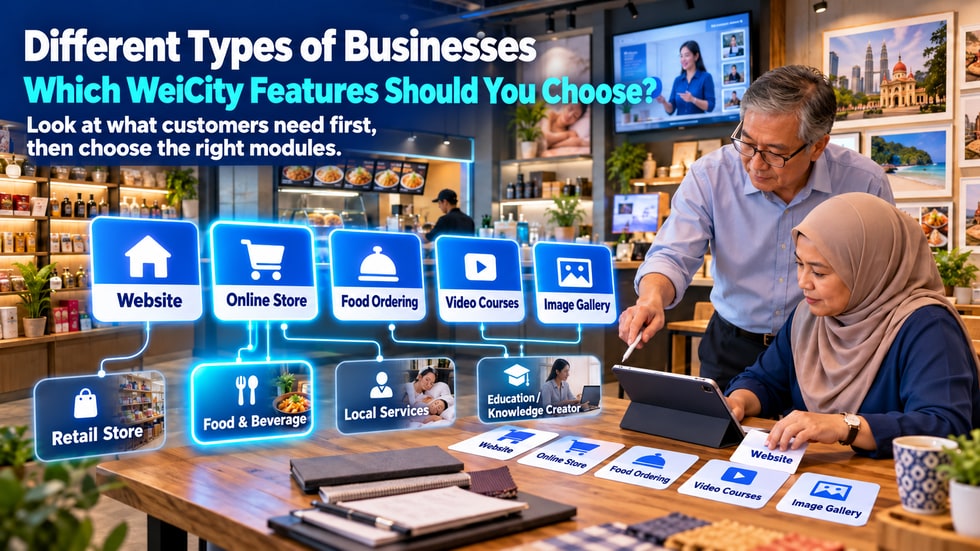
💡 Different businesses need different online features. Retail merchants need to display and sell products, food businesses need to handle orders and pickup, service providers focus on introductions, case studies, and contact entry points, and education providers and creators may need courses or work showcases. This article introduces the five main WeiCity merchant features and helps merchants choose the right combination based on customer actions, avoiding pages that are complicated yet hard to use.
When setting up a merchant channel, many merchants ask:
"Which features should I turn on?"
Some worry that having too few features won't meet customers' needs.
Others turn on every feature at once, and the channel ends up with many empty pages, leaving them unsure which one to manage first.
The right features are not about having as many as possible.
Merchants should first understand what customers need to accomplish after entering the channel, and then choose modules that support those actions.
Rather than first asking "What features does the platform have?", ask:
• What do customers most need to know after entering the channel?
• Should customers view products, works, or the menu?
• Do customers need to buy, place an order, or watch courses?
• Should customers pay directly, or contact the merchant first?
• What proof do customers need before purchasing?
Different answers correspond to different features.
For example:
Customers need to learn about the brand and contact information:
Suitable for choosing the Website feature.
Customers need to view and purchase physical products:
Suitable for choosing the Shop feature.
Customers need to choose dishes, add-ons, and a delivery method:
Suitable for choosing the Online Ordering feature.
Customers need to purchase and watch systematic courses:
Suitable for choosing the Video Course feature.
Customers need to first view works, environments, or service results:
Suitable for choosing the Gallery feature.
According to WeiCity's official public information, the merchant channel can install five main feature modules as needed.
🌐 Website
Suitable for introducing the brand, business, contact information, and services.
🛒 Shop
Suitable for displaying and selling physical products, digital products, or other content that can be purchased online.
🍽️ Online Ordering
Suitable for restaurant menus, add-ons, delivery, self-pickup, and online payment.
🎓 Video Courses
Suitable for organizing instructional videos into a series of courses that can be studied continuously.
🖼️ Gallery
Suitable for showcasing works, cases, environments, event photos, and visual content.
Merchants do not need to use all five at once.
You can first choose one or two modules that best support your main customer actions.
The Website feature suits almost all types of businesses, because every merchant needs a basic introduction entry point.
You may show:
• Merchant name
• Brand introduction
• Main business
• Customers served
• Business hours
• Address or service area
• Contact details
• Frequently asked questions
• Inquiry entry point
The Website feature is especially suitable for:
• Local service businesses
• Consultants and professionals
• Repair and installation services
• Beauty, hair and wellness businesses
• Educational institutions
• Studios
• Corporate brands
• Personal brands
If customers need to get to know the business before making a purchase, the website module should usually be the foundation.
The Shop is suitable for businesses with clear products, prices and stock.
For example:
• Clothing and footwear
• Beauty and care products
• Food gift boxes
• Handicrafts
• Household goods
• Stationery and gifts
• Digital products
• Course materials
WeiCity Shop supports multiple product images, product variants, inventory management, shopping cart and online payment.
Customers can go from viewing products to the shopping cart, then check out in Malaysian Ringgit (MYR).
The Shop helps solve:
• Scattered product information
• Customers repeatedly asking about prices
• Difficulty calculating orders with multiple items
• Errors with variants and inventory
• Payment processes that require manual handling
If the customer's main action is "choose products and pay," the Shop is the core module.
Online Ordering is designed mainly for food and beverage businesses.
Suitable for:
• Restaurants
• Coffee shops
• Hawkers and cooked food vendors
• Dessert shops
• Home bakeries
• Beverage shops
• Bento and catering businesses
• Festive food pre-orders
WeiCity food ordering supports:
• Food menus
• Multiple-choice add-ons
• Add-on prices
• Delivery or self-pickup
• Minimum order amount
• Scheduled pickup dates and time slots
• Ordering and payment process
If customers need to choose dishes, flavours, add-ons and pickup or delivery methods, use the Online Ordering module first, rather than treating all dishes as ordinary products.
Video courses are suitable for businesses that need to deliver teaching content in a set sequence.
For example:
• Online education
• Skills training
• Fitness instruction
• Cooking classes
• Beauty technique training
• Photography courses
• Corporate internal training
• Creator teaching series
Video courses let you organise multiple lessons into a single series.
Customers do not need to search through many separate videos to find the next lesson.
Businesses can plan:
• Course introduction
• Learning objectives
• Suitable customers
• Course chapters
• The topic of each lesson
• Free preview content
• Full course price
If a course is paid, set it up according to the platform's current merchant plans and paid content rules.
The Gallery is suitable for businesses that need to build trust through visual results.
For example:
• Photographers
• Interior designers
• Wedding and event planning
• Beauty and hair services
• Renovation and construction services
• Artists and designers
• Travel and accommodation businesses
• Handmade craft studios
• Food and venue businesses
The Gallery can show:
• Finished work
• Before-and-after service results
• In-store environment
• Event records
• Different design styles
• Product collections
• Customer stories
If customers usually ask first, "Can I see examples of your work?", the Gallery module is important.
Recommended basic combination:
• Website
• Shop
The website is responsible for introducing the brand and contact methods.
The Shop is responsible for displaying products, variants, inventory, shopping cart and payment.
If the products depend heavily on visuals, you can also add the Gallery to show photo collections or usage scenarios.
Suitable for:
• Clothing
• Gifts
• Beauty products
• Household goods
• Stationery
• Handicrafts
To start, you can publish your ten most popular products first; there is no need to upload all of your stock at once.
Recommended basic combination:
• Website
• Online Ordering
The website is responsible for introducing the restaurant, opening hours, location and contact details.
Online Ordering is responsible for menus, add-ons, delivery, self-pickup and payment.
If the restaurant also sells shelf-stable packaged products, gift boxes or paid vouchers, you can add the Shop as needed.
If the main business is food ordering, there is no need to set up a complicated general Shop first.
Recommended basic combination:
• Website
• Gallery
The website is responsible for explaining the services offered, service areas, price ranges and contact methods.
The Gallery is responsible for showing case studies, environments, equipment and completed work.
Suitable for:
• Home repairs
• Cleaning services
• Car care
• Beauty and hair styling
• Photography services
• Renovation and design
• Event setup
If your services have fixed packages and are suitable for direct online purchase, you can consider the Shop or paid vouchers.
If each customer's situation is different, let customers review your information and case studies first, then contact the business to confirm.
Recommended basic combination:
• Website
• Video courses
The website is responsible for introducing the institution, teachers, target students and learning outcomes.
Video courses are responsible for organising course content and learning sequence.
If you also sell textbooks, tools or course supplies, you can add the Shop.
If student work helps build trust, you can also add the Gallery.
Suitable for:
• Tuition and educational institutions
• Skills trainers
• Online instructors
• Fitness coaches
• Beauty training
• Art and music teachers
Recommended basic combination:
• Website
• Gallery
The website is responsible for explaining services and contact methods.
The Gallery is responsible for showcasing work and style.
If you sell printed works, templates, photo products or other goods, you can add the Shop.
If you also teach related skills, you can add video courses.
Customers usually judge whether a style suits them through the work first, so the Gallery should be clear, well categorised and updated regularly.
We recommend starting with the website.
Suitable for:
• Consultants
• Coaches
• Lecturers
• Professional service providers
• Freelancers
• Content creators
The website can focus on:
• Personal introduction
• Professional experience
• Service content
• Articles and perspectives
• Contact Methods
As your business grows, add:
• Gallery to showcase case studies
• Shop to sell products
• Video courses to sell knowledge
Do not copy every module at once just because other businesses use many of them.
Question 1: Do customers only need to learn about you and get in touch?
Choose:
• Website
Question 2: Do customers need to select products and pay directly?
Choose:
• Website + Shop
Question 3: Do customers need to order food, choose add-ons and select a delivery method?
Choose:
• Website + Online Ordering
Question 4: Do customers need to watch teaching content in a set order?
Choose:
• Website + Video Courses
Question 5: Do customers need to review a large number of works and case studies first?
Choose:
• Website + Gallery
If you answer "yes" to several questions, combine the corresponding features.
Merchants can start in three stages.
1️⃣ Stage 1: Establish a basic entry point
• Complete the website and About information
• Fill in contact details
• Set up business information
2️⃣ Stage 2: Complete the main action
Choose based on your business:
• Shop
• Online Ordering
• Video courses
• Gallery
3️⃣ Stage 3: Add supporting content
• Publish articles
• Share real case studies
• Set up promotions
• Add products or courses
• Refine section categories
Get one main customer path running fully before adding more features.
• Turning on all modules at the start
• Modules turned on but with no content
• Setting up retail products using the Online Ordering method
• Setting up all menu items as ordinary products
• Video lessons not organised in learning order
• Service businesses writing only introductions without case photos
• Many photos uploaded to the Gallery without any categories
• Feature names do not match what customers actually need
• Merchant did not test mobile operation
The more features there are, the more management work the merchant has.
Unused blank modules may actually make the channel look unfinished.
After completing the setup, you can ask a friend who is not familiar with the merchant to test it.
Give them a simple task, for example:
• Find a specified product and add it to the shopping cart
• Choose a meal and check the pickup method
• Find three service case studies
• Find the course introduction and the first lesson
Observe whether they can complete it smoothly.
If they often ask "Where is the next step?", adjust the sections, descriptions, or combination of features.
• Have you clearly defined the customer's main action?
• Have you chosen the website as the basic introduction entry point?
• Do you really need the Shop?
• If your business serves food, do you use the Online Ordering feature?
• Do courses need to be organized into series?
• Do works and case studies need to be displayed in the Gallery?
• Does every enabled module have content?
• Are there clear connections between the features?
• Do customers know what to do next?
• Can the merchant keep managing these features?
• Have you completed the mobile test?
Features that can be used consistently matter more than turning on many features at once.
WeiCity offers websites, the Shop, Online Ordering, video courses, the Gallery, and more, but each merchant does not need exactly the same combination.
When choosing features, do not start from "What else can I add?"
Start from "What does the customer need to do when they come here?"
Retail customers need to buy products.
Dining customers need to place an order.
Service customers need to review case studies and contact the merchant.
Learners need to understand and watch the course.
Portfolio-based merchants need to showcase their results.
When features match customer actions, the channel is simpler and the merchant is easier to manage.
👉 Start with one basic website module and one main feature to build a WeiCity merchant channel that suits your business, then gradually add other modules based on real customer needs.