

21 🍽️ How can food and beverage merchants offer online ordering, delivery, and scheduled pickup?
🛵 Put the menu, add-ons, delivery or self-pickup, time slots, and payment into one clear ordering path
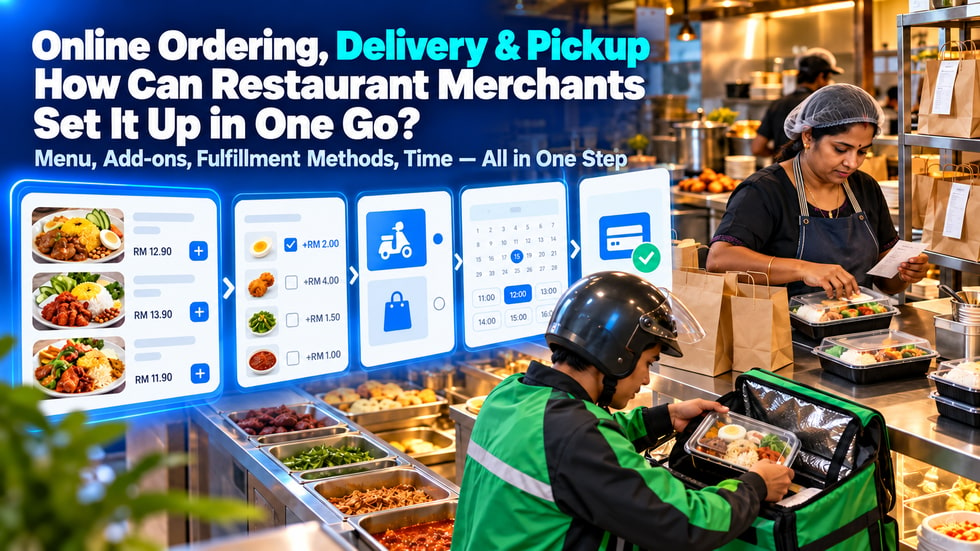
💡 Taking food orders through chat can easily lead to missed add-ons, incomplete addresses, unclear pickup times, and calculation errors. WeiCity food ordering supports multi-select add-ons with added charges, lets customers choose delivery or self-pickup, and lets merchants set a minimum order amount for delivery. For scheduled pickup, customers can choose a date and time slot during checkout. This article explains how food and beverage merchants can organize their menus, set up options, and test the complete ordering process.
Many dining merchants receive orders through chat.
Customers send the names of the dishes they want, and the merchant then asks about quantity, add-ons, address, delivery time and payment method.
When order volume is low, this approach seems simple.
However, during lunch, dinner or festive peak periods, chat orders can easily run into problems.
• Customers forget to state the quantity of each dish
• Merchants forget to record add-ons
• Delivery addresses are incomplete
• Customers assume the order is for delivery, but the merchant prepares it for pickup
• Pickup time is not confirmed
• Merchants calculate the order total incorrectly
• Payment records cannot be matched to the order contents
The purpose of online ordering is to organize this information into choices that customers can complete step by step.
When ordering online, customers usually need to complete the following:
1️⃣ Browse the menu
2️⃣ Select dishes
3️⃣ Choose portion sizes or add-ons
4️⃣ Confirm item quantities
5️⃣ Choose delivery or self-pickup
6️⃣ Enter the required details
7️⃣ Select a scheduled date and time
8️⃣ Check the order total
9️⃣ Complete payment
🔟 Wait for the merchant to prepare the order
The clearer these steps are, the less the merchant needs to follow up through chat.
Customers can also confirm their complete selections before paying.
Do not rush to put all dishes online at once.
Start by dividing the menu into categories that customers can easily understand.
For example:
• Main dishes
• Noodles and pasta
• Snacks
• Drinks
• Set meals
• Vegetarian options
• Kids' meals
• Festive specials
• Pre-order dishes
Do not include too many dishes in any one category.
If the same dish differs only in portion or flavor, you can organize these differences as options instead of creating many duplicate products.
Customers cannot ask counter staff questions directly, so dish pages need to provide enough information.
These may include:
• Dish name
• Clear photo of the actual dish
• Main ingredients
• Portion description
• Base price
• Flavor options available
• Toppings that can be added
• Whether advance ordering is required
• Estimated preparation time
• Delivery or self-pickup instructions
• Notes customers should be aware of
Do not use names such as "Signature Meal" or "Special Set" without explaining what is actually included.
Customers should be able to know what dishes they will receive before ordering.
The official WeiCity merchant section shows that dishes support multiple add-on selections, and that add-ons can be given an additional price.
For example, a rice dish could offer:
• Add egg + RM2
• Add fried chicken + RM4
• Add vegetables + RM1.50
• Add chili sauce + RM1
A drink could offer:
• Add pearls
• Add cheese foam
• Add espresso shot
• Switch to plant-based milk
When setting up add-ons, pay attention to the following:
• Keep names simple and clear
• Make sure add-on prices are accurate
• Update sold-out add-ons promptly
• Do not offer combinations the kitchen cannot handle at the same time
• Check that the checkout total increases correctly
After customers make their selections, the add-on details should appear clearly in the order so the kitchen can prepare it accordingly.
Some customers may write the following in order notes:
• No chili
• Less sugar
• No certain ingredient
• Sauce on the side
• Number of utensils
Requests that are common and that the kitchen can handle consistently can be considered for clear options.
For requests that appear only occasionally or require merchant confirmation, have customers explain through notes or by contacting the merchant.
Merchants should also remind customers that notes may not always change the basic contents of a dish.
For food allergies or serious dietary restrictions, customers should confirm directly with the merchant first and should not rely only on order notes.
WeiCity dining orders allow customers to choose delivery or self-pickup.
If the merchant offers delivery, the following should be explained in advance:
• Areas where delivery is available
• Delivery distance or range
• Delivery service hours
• Minimum order amount
• Whether a delivery fee is charged
• Estimated delivery time
• Address details customers need to provide
• Areas or buildings with access restrictions
• Possible delays due to rain, traffic or peak periods
Merchants can decide based on their operating capacity:
• Self-delivery by the merchant
• Using the merchant's own delivery staff
• Arranging third-party delivery separately
The official public WeiCity pages confirm that customers can choose delivery, but do not state that the platform automatically provides delivery riders.
Therefore, delivery staff and how deliveries are carried out should be explained by the merchant according to its actual arrangements.
Complete delivery details may include:
• Recipient name
• Contact phone number
• Full address
• Floor or unit number
• Building or shopping mall name
• Nearby landmark
• Guard post or access method
• Necessary delivery instructions
After receiving an order, the merchant should first check whether the address is within the delivery range.
If details are incomplete, contact the customer to confirm as soon as possible to avoid discovering after the food is ready that delivery is not possible.
The delivery range and minimum spend should be clearly explained before the customer pays.
Some customers live nearby or prefer to arrange their own pickup time.
Merchants can offer self-pickup and explain:
• Pickup address
• Pickup entrance
• Business hours
• Estimated preparation time
• How customers should collect their order upon arrival
• Whether an order number is required
• Whether there is a dedicated pickup counter
• How late pickups should be handled
Merchants should clearly distinguish between delivery and self-pickup.
Do not let customers find out only after paying that the order defaults to self-pickup.
The official WeiCity channel explains that scheduled pickup allows customers to choose a date and time slot for in-store pickup at checkout.
This method is suitable for:
• Lunch pre-orders
• Dinner sets
• Cakes and desserts
• Festive gift boxes
• Family meals
• Group orders
• Dishes that require longer preparation time
When customers choose a pickup date and time slot in advance, the kitchen can plan the preparation sequence.
Merchants can also reduce situations where all customers arrive and wait at the same time.
Pickup time slots should be set according to the kitchen's actual handling capacity.
For example:
• 11:30 to 12:00
• 12:00 to 12:30
• 12:30 to 13:00
• 17:30 to 18:00
• 18:00 to 18:30
When setting time slots, consider:
• How much preparation time each portion requires
• The maximum number of orders that can be handled in one time slot
• Whether packaging time needs to be reserved
• The number of walk-in customers during peak periods
• The number of staff available
• Whether large orders need to be booked earlier
Do not open time slots the kitchen cannot complete just to give customers more choices.
If a time slot is fully booked, stop accepting new orders for that slot.
WeiCity dining orders support setting a minimum order amount for merchants.
A minimum order amount can help merchants avoid orders that are too small but still require high packaging and delivery costs.
Before setting it, consider:
• Average dish price
• Packaging cost
• Delivery distance
• Delivery staff time
• Payment cost
• The lowest order amount the merchant can accept
The minimum order amount should be clearly displayed when customers select delivery.
Do not let customers complete their selections only to find at the last step that the order total is too low.
If self-pickup has no minimum amount, the conditions for delivery and self-pickup should also be clearly distinguished.
The official WeiCity merchant section explains that dining orders and payment can be completed in the same process.
After customers complete their dish, add-on, quantity and delivery method selections, they can review the order and proceed to payment.
Displaying order prices in Malaysian ringgit (RM) allows customers to confirm:
• Food amount
• Add-on amount
• The quantity of products
• Order total
• Delivery or self-pickup method
• Booking date and time
The more complete the information before payment, the fewer chances there will be to modify the order after payment.
Before the official launch, merchants should complete the required payment settings and test the checkout process.
Online orders still need a clear internal handling method.
Orders can be divided into:
• Pending confirmation
• In preparation
• Completed
• Waiting for self-pickup
• Waiting for delivery
• Delivered
Kitchen staff need to be able to quickly see:
• Dish name
• Quantity
• Add-ons
• Special requests
• Delivery or self-pickup
• Book a time
• Customer contact information
If several people handle orders together, it should be clear who checks new orders, who prepares the food, who handles packaging, and who hands the order to the customer or delivery staff.
Both delivery and self-pickup food need suitable packaging.
Merchants should check:
• Whether containers can be sealed
• Whether hot and cold food are kept separate
• Whether soups or sauces can easily leak
• Whether sauces need to be packed separately
• Whether utensils are provided as needed
• Whether the package is labeled with the order
• Whether multiple orders are easy to tell apart
After packaging is complete, you can check the food, quantities, and add-ons once more.
Do not identify orders by customer name alone. When there are many orders, you can also use order numbers.
Online ordering can increase orders, but kitchen capacity does not increase automatically.
Merchants should decide in advance:
• The maximum number of orders to handle in each time slot
• Which dishes to pause during peak hours
• How far in advance large orders must be booked
• Whether the delivery range needs to be reduced
• Who is responsible for updating sold-out items
• How to notify customers when orders are overloaded
First make sure orders already received can be completed on time, then consider increasing the number of orders accepted.
Continued delays will affect customers' trust in the merchant.
• Menu categories are too complicated
• Dishes do not have clear photos
• Prices differ from the actual charges
• Add-on names are unclear
• Sold-out dishes can still be selected
• The delivery range is not explained
• The minimum order amount only appears at checkout
• Delivery and self-pickup are not clearly distinguished
• Booked time slots exceed kitchen capacity
• No one checks orders after customers pay
• Kitchen, packaging, and delivery staff have no division of labor
These problems can turn online ordering into a new source of confusion.
Test orders must be completed before formal promotion.
You can separately test one delivery order and one self-pickup order.
Delivery test:
• Select dishes
• Add two add-ons
• Change the quantity
• Select delivery
• Check the minimum order amount
• Fill in delivery information
• Check the order total
• Complete a test payment
Self-pickup test:
• Select dishes
• Select self-pickup
• Select a date
• Select a time slot
• Check pickup information
• Complete a test payment
After testing, merchants should also check whether the received order fully shows the dishes, add-ons, method, and time.
• Are menu categories clear?
• Are dish names and photos correct?
• Are the prices accurate?
• Are add-ons and surcharges correct?
• Are sold-out items updated promptly?
• Is the delivery range explained?
• Is the minimum order amount reasonable?
• Have delivery arrangements been made?
• Is the self-pickup address accurate?
• Are booking dates and time slots workable?
• Is the order total correct?
• Does online payment work properly?
• Does the kitchen know how to handle orders?
• Has the merchant completed delivery and self-pickup tests?
After completing these checks, share the ordering entry with customers.
The value of online ordering is not just putting a paper menu online.
It should organize dishes, add-ons, delivery method, pickup time, and payment into one clear path.
Customers do not need to keep asking questions, and merchants can receive more complete order information.
You can start by listing the most popular and easiest-to-prepare dishes first.
After confirming that ordering, payment, kitchen, and pickup processes run smoothly, gradually add other dishes and delivery areas.
👉 Use WeiCity Restaurant Ordering to connect your menu, add-ons, delivery, self-pickup, and online payment, making it easier for customers to order and helping your restaurant handle every order more accurately.