

3 How to Arrange a Video Series: Organize Content into a Continuous Course
From learning goals and unit division to viewing order, guide users step by step through learning
Planning to publish a video series on WeiCity? Start by organizing your teaching topic into a clear course structure. This article explains how to define learning goals, divide video units, arrange viewing order, and write clear titles and course descriptions, helping creators organize scattered videos into continuous content that is easy to understand and practice.
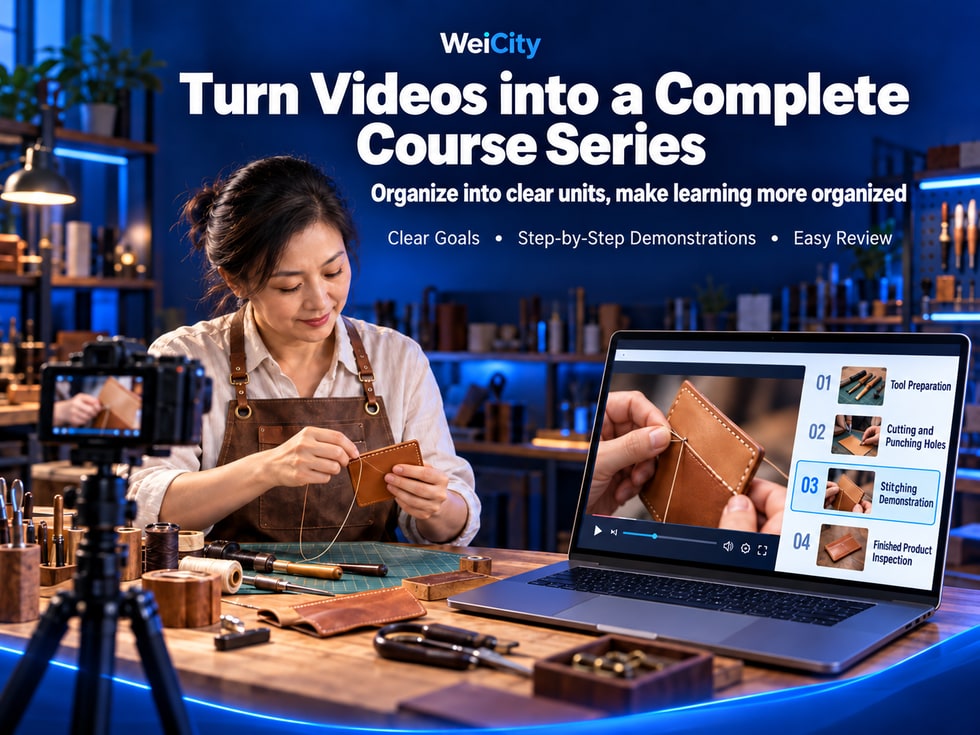
You have recorded several instructional videos, but you are not sure how to organize them into a complete course?
For example:
🧵 A craft creator has filmed videos on introducing tools, cutting materials, making stitches, and completing finished works.
🍰 A baking instructor has recorded lessons on preparing ingredients, making dough, baking, and decorating the finished products.
📸 A photographer has prepared demonstrations on lighting setup, camera settings, shooting angles, and photo adjustment.
🎨 A painting teacher has recorded introductions to art supplies, line practice, color techniques, and complete artwork lessons.
💻 A software instructor has produced several operation videos and wants beginners to learn them in order.
If these videos are published separately, each one may have useful content, but viewers may not know which one to watch first or easily understand how the different steps relate to each other.
If related videos are organized according to learning goals, operating sequence, and knowledge difficulty, they can form a more structured video series.
The value of a WeiCity video series is that it helps creators organize multiple related videos into continuous content based on the features they can actually use, so users can more easily understand the course structure, follow along, and review key points.
For merchants, instructors, and content creators, a good video course is not just a collection of videos placed together.
What matters more is:
🎯 It has clear learning objectives.
👥 It clearly identifies who it is suitable for.
📚 It has a reasonable course structure.
🎬 Each video has a specific focus.
🔢 The videos are presented in the correct order.
👀 Users know where to start.
💰 Paid content has clear purchase information.
📱 It is also easy to understand when watched on a phone.
This article explains how to organize videos you have already filmed into a complete course, including learning objectives, unit division, video naming, course outlines, free previews, paid settings, and publishing checks.
Before organizing your videos, it is recommended that you first answer one question:
After completing this course, what should users be able to understand or try to accomplish?
This objective determines what content the entire course should include.
Learning objective:
Understand basic lighting and background arrangement, and practice taking a set of clear product photos.
Learning objective:
Learn basic tools and follow the steps to complete a simple handmade piece.
Learning objective:
Understand the basic bread-making process and try to complete an beginner-level bread.
Learning objective:
Learn basic art supplies, simple lines, and color combinations, and complete a practice painting.
Learning objective:
Master common operations and be able to complete a specific task by following a demonstration.
If the objective is unclear, the course may run into the following problems:
The scope of content is too broad.
Video topics are repetitive.
Important steps are missed.
Beginners find it hard to keep up.
Learners do not know what they have learned after the course ends.
Not recommended:
"Learn all photography techniques"
It can be changed to:
"Learn to use simple lighting and backgrounds to take basic photos suitable for product display."
Not recommended:
"Become a professional baking master"
It can be changed to:
"Learn basic ingredients and production processes, and practice making a basic bread."
📌 The clearer the learning objectives, the easier it is to arrange video content, and the easier it is for users to judge whether the course suits them.
The same set of videos may meet completely different learning needs for beginners and experienced people.
Therefore, before organizing your videos, you should first determine the target audience.
Suitable for:
Introduction to tools.
Basic concepts.
Simple steps.
Common mistakes.
Suitable for:
Advanced operations.
Complex techniques.
Problem analysis.
Real case studies.
For example:
Small merchants who run online stores.
Professionals who provide services.
Creators who want to improve their work skills.
For example:
Those who want to learn mobile product photography.
Those who want to make basic handmade items.
Those who want to master a specific software function.
If learners need to prepare materials themselves, this should be clearly stated in advance.
For example:
📸 Photography course: phone, lighting equipment, shooting backdrop.
🧵 Handicraft course: leather, needles and thread, cutting tools.
🍰 Baking course: ingredients, oven, and basic utensils.
💻 Software course: computer, related software, and applicable versions.
If the course requires learners to already have certain knowledge, this should also be explained in advance.
📌 Clearly explaining the target audience and preparation requirements can reduce cases where users discover after purchasing or starting to watch that the course is not suitable for them.
A video course can be divided into several units according to the actual learning process.
Each unit should revolve around one clear, small objective.
For most introductory lessons, you may refer to the following structure.
Instructions:
Course topic.
Learning objectives.
Intended readers.
Main content.
Introduction:
Tools needed.
Material selection.
Operating environment.
Basic precautions.
Explain important concepts that will be used in later operations.
Show the operating methods in their actual order.
Analyze mistakes that are likely to occur.
Introduce how problems can be checked and handled.
Connect the previous steps together.
Organize key learning points and a practice checklist.
No.
A simple topic may only need three to five videos.
A more complex topic may need ten or more.
Do not deliberately split a large amount of similar content into many videos just to make the course look richer.
📌 A good video series focuses on each unit having a clear purpose, not on having as many units as possible.
A common problem when creating video courses is that a single episode covers too much.
For example, one video introduces at the same time:
Tools.
Materials.
Making steps.
Price.
Common mistakes.
Follow-up practice.
Viewers may find it hard to remember the key points.
When they later want to review a certain operation, it is also hard to find the relevant section.
For example:
📸 Lesson 3: How Do You Choose a Background for Product Photography?
This episode mainly explains how to choose a background.
It does not need to cover all photography techniques in depth at the same time.
Tell viewers what this episode will cover.
For example:
"This lesson introduces how to choose a shooting background suitable for small products."
Demonstrate specific methods.
Explain details that are easy to overlook.
Introduce what the next episode will continue with.
For example:
"The next lesson will introduce how to adjust the position of the lighting."
There is no fixed length.
Simple operations can be explained with shorter videos.
Steps that need detailed demonstration should be given enough time.
The main purpose of an instructional video is to help learners understand the operations.
📌 Focusing each episode on solving one problem makes the course easier to learn and easier to review later.
The video order should follow the actual learning process as closely as possible.
This is especially important for beginners.
Understand the goal first, then prepare the tools.
Learn the basics first, then perform operations.
Complete simple steps first, then handle complex content.
Understand the method first, then do a complete practice.
Identify problems first, then learn how to improve them.
Not recommended:
Lesson 1: Complex lighting techniques.
Lesson 2: Getting to know the camera.
Lesson 3: Preparing the background.
Lesson 4: Basic exposure.
This order may confuse beginners.
📸 Lesson 1: Course introduction and shooting goals.
🧰 Lesson 2: Getting to know shooting equipment.
🏠 Lesson 3: Preparing the shooting space.
💡 Lesson 4: Understanding basic light.
📷 Lesson 5: Live shooting demonstration.
🔍 Lesson 6: Common problems and adjustments.
🏁 Lesson 7: Complete a product shooting exercise.
You can first list the names of all the videos.
Then check:
Which ones cover basic content?
Which ones cover preparation steps?
Which ones are hands-on practice?
Which ones are advanced techniques?
Which ones are supplementary notes?
Finally, rearrange them.
📌 Even if the videos were not filmed in course order, you can first organize them by topic and then plan a sensible viewing sequence.
A video title should let users know what the episode mainly covers before they open it.
Lesson 1.
Lesson 2.
Lesson 3.
Teaching Video 1.
Teaching Video 2.
🎬 01 | Course introduction and learning goals.
🧰 02 | Getting to Know Tools and Materials.
📏 03 | Measuring and Basic Preparation.
🛠️ 04 | Main Making Steps.
🔍 05 | Common Mistakes and Adjustment Methods.
🏁 06 | Finishing the Piece and Checking Details.
Because numbers help users understand the viewing order.
Because users may later want to review just one particular step.
For example:
“05 | Basic Stitching and Finishing”
Compare:
“Lesson 5”
are easier to recognize.
Keep the number format consistent.
Keep names concise.
The topic is clear.
Avoid exaggerated descriptions.
Make sure it matches the actual content.
📌 Clear video titles not only help first-time learners, but also make it easier for users to find content again later.
Suppose you are a handmade leather goods creator.
You have already filmed the following content:
Introduction to leather materials.
Tool preparation.
Cutting demonstration.
Punching techniques.
Stitching method.
Edge finishing.
Finished product showcase.
Frequently asked questions.
These videos can be organized into:
🧵 Handmade Card Holder Beginner Course: From Material Preparation to Finished Work
Help beginners get to know basic tools and follow the demonstrations to make a simple card holder.
Beginners in handmade leather goods.
People who enjoy handmade crafts.
Creators who want to learn basic stitching techniques.
Suitable leather.
Measuring tools.
Cutting tools.
Punching tools.
Needles and thread.
Necessary work protection supplies.
Show the finished card holder.
Introduce the course scope.
Explain who it is suitable for.
Introduce the uses of materials.
Explain how to choose tools.
Point out safety considerations.
Demonstrate measuring positions.
Introduce marking methods.
Explain cutting precautions.
Introduce hole layout.
Demonstrate basic punching methods.
Explain common problems.
Show the stitching steps.
Explain how to keep even spacing.
Introduce finishing methods.
Introduce basic trimming methods.
Show the finished result.
For example:
Misaligned holes.
Uneven stitching.
Untidy material edges.
Check the card holder's appearance.
Confirm basic everyday use.
Summarize key learning points.
Because the course follows the actual making process.
Learners can start with tool preparation and gradually complete the piece.
When they run into problems, they can also find the related unit by its video title.
📌 Hands-on courses are best arranged according to the process of preparing, making, checking, and improving.
Not all courses suit the same structure.
You can adjust based on the teaching content.
🎬 01 | Getting to Know the Course and Production Goals.
🧰 02 | Preparing Ingredients and Tools.
⚖️ 03 | Ingredient Ratios and Measuring.
🥣 04 | Mixing and Kneading Methods.
⏳ 05 | Fermentation and Observing Dough Condition.
🔥 06 | The Baking Process.
🍞 07 | Checking the Finished Product.
🔍 08 | Common Causes of Failure.
🎬 01 | Course Introduction.
📱 02 | Getting to Know Shooting Equipment.
🏠 03 | Preparing the Shooting Environment.
💡 04 | Basic Lighting Setup.
📷 05 | Shooting Angles and Composition.
🖼️ 06 | Photo Selection and Organizing.
🔍 07 | Common Shooting Problems.
🏁 08 | Complete Shooting Practice.
🎬 01 | Getting to Know Painting Tools.
✏️ 02 | Basic Line Practice.
📐 03 | Simple Shapes and Composition.
🎨 04 | Getting to Know Basic Color Mixing.
🖌️ 05 | Step-by-Step Painting Demonstration.
🖼️ 06 | Completing the Artwork.
🔍 07 | Common Problems and Practice Suggestions.
🎬 01 | Course Goals and Software Introduction.
💻 02 | Getting to Know the Interface.
📁 03 | Creating and Organizing Files.
🛠️ 04 | Common Feature Operations.
📋 05 | Real Task Demonstration.
🔍 06 | Handling Common Errors.
🏁 07 | Complete Operation Practice.
If the content is mainly knowledge explanation, you can add concept explanations and case analysis.
If the content is mainly operation-based, you can add step-by-step demonstrations and practice.
📌 Course structures do not need to be identical, but every video should be arranged around the overall learning goals.
For paid video courses, users usually want to understand the actual content before purchasing.
For example:
How does the instructor explain things?
Is the picture clear?
Is the course suitable for beginners?
What topics does the content include?
If WeiCity's current features support free previews, you can arrange some preview content according to your actual settings.
Explain the main learning goals.
Show the complete chapters.
Explain who it is suitable for.
Select a short, representative segment of the teaching.
Let users know which tools are needed.
A handmade card holder course can offer:
Course introduction.
Finished product showcase.
Some tool descriptions.
A short segment of actual hands-on demonstration.
Do not use only polished promotional visuals without showing the real teaching style.
Its purpose is to help users judge whether the content meets their needs.
📌 A good free preview helps users understand the course better, so they can decide for themselves whether to buy.
If a video series is paid content, the purchase details should be as clear as possible.
Users need to know:
Which videos can be watched after purchase?
How many episodes have been released so far?
Is there more content to come?
What do they need to prepare themselves?
Is there a viewing time limit?
For example:
Includes eight teaching units.
Explain the main topic of each episode.
Confirm the actual price and currency.
If there is an access period, state it in advance.
If the course will keep adding content, state the actual plan.
State whether they need to be purchased separately.
If templates, checklists, or other files are included, describe them accurately.
Explain how to get in touch before and after purchase.
Explain the applicable access, cancellation, and refund conditions.
🧵 Handmade Card Holder Beginner Course
Course content:
Eight teaching units.
From tool preparation to finished work.
Includes basic stitching and explanations of common problems.
Tools and materials must be prepared by the learner.
If the course does not include physical materials, this should be stated clearly.
If one-on-one guidance is not provided, do not let users mistakenly believe they will receive personal teaching services after purchase.
📌 The purchase instructions for a paid video course should accurately reflect the content and benefits users will actually receive.
Some creators produce courses in stages.
For example:
Ten episodes are planned, and six have been completed so far.
In this situation, the purchase instructions require special attention.
videos that have already been published.
videos that are not yet finished.
The expected update schedule.
Course name:
📸 Product Photography Basics Course
Planned content:
Ten units.
Currently completed:
Six units.
If you plan to open purchases before the entire course is complete, first confirm whether WeiCity's current features support the corresponding publishing and purchase arrangements.
For example:
Only six episodes exist, but the listing directly says "The complete ten-episode course is now available."
Update the relevant instructions promptly and properly handle any commitments already made to buyers.
When creating a paid course for the first time, consider completing the main content before publishing.
This makes it easier to check whether the entire course is complete.
📌 Course release progress should be transparent so users know what they can watch right now.
Many users watch instructional videos on their phones.
For this reason, videos should not be checked only on a computer.
Is the explanation easy to understand?
Are key actions easy to identify?
For example:
Stitch positions.
Tool scales.
Software buttons.
Avoid using text that is too small in videos.
Check for cropping and black bars based on how the video will actually be displayed.
Confirm that the table of contents matches the actual order.
Make sure titles do not contradict the content.
Test based on the current page's actual functions.
If a preview is offered, confirm the range that is actually displayed.
Make sure users can see the necessary requirements before purchasing.
For example:
Have someone without relevant background watch the course introduction and part of the lesson.
Observe whether they know:
which episode they should watch first.
what they need to prepare.
what they should do next.
📌 A good mobile viewing experience makes course content easier to actually use.
Once videos have been filmed, two problems most easily occur.
One is repetition.
The other is omission.
Spending a long time introducing the same tool in every episode.
Explaining the same concept repeatedly across multiple videos.
Repeatedly demonstrating the same operation in different chapters.
Not explaining preparation steps.
Skipping key operations.
Using technical terms that have not yet been introduced.
Not showing the finished result.
| Video unit | Main content | Completed? |
|---|---|---|
| 01 | Course introduction | Completed |
| 02 | Tools and materials | Completed |
| 03 | Basic preparation | Completed |
| 04 | Main action | To be checked |
| 05 | Common issues | Completed |
| 06 | Complete practice | To be added |
The above is only a planning example.
Does this video have a distinct focus?
Does it heavily repeat other videos?
Do learners need to master other knowledge first?
Are any necessary steps missing?
Some important safety matters or key operations may need to be reminded appropriately.
However, unnecessary large amounts of repetition should be avoided.
📌 The purpose of organizing a course is to give each video a clear role and together achieve the overall learning goal.
The course introduction should help users understand the main content before watching or purchasing.
You can use the following structure.
🧵 Leather Card Holder Beginner Course: From Tool Preparation to Finished Project
"This course is suited to learners who are just starting with hand-crafted leather goods. Through step-by-step videos, it introduces basic tools, material preparation, cutting, punching, stitching, and finishing, helping learners follow the demonstrations to complete a simple card holder."
Beginners in handmade leather goods.
People who want to learn basic stitching.
People who enjoy handcrafting.
Get to know basic tools.
Understand the main making steps.
Try completing a simple card holder.
01 | Course introduction.
02 | Tools and materials.
03 | Measuring and cutting.
04 | Punching techniques.
05 | Basic stitching.
06 | Edge finishing.
07 | Common issues.
08 | Finished product check.
Explain the tools and materials that learners need to prepare themselves.
If offered, explain what content can be previewed.
Explain the actual price and what is included.
If there is a time limit, state it in advance.
Provide a valid contact channel.
📌 A good course introduction does not need excessive promotion; it should make clear to users what they will learn.
After a video series is complete, you can introduce the course through related knowledge articles.
For example:
A photographer plans to publish:
📸 Mobile Product Photography Beginner Video Course
You can first publish free articles.
Why are product photos often blurry?
What tools are needed for indoor product photography?
How do you choose a background for product photography?
Mobile Product Photography Basics: From Shooting Preparation to Practical Demonstration
If WeiCity's current article editor supports related links, you can provide a course details entry point in the free articles.
For example:
"To watch the complete shooting demonstration, you can view the Mobile Product Photography video course."
Free articles can help users understand basic questions.
The video series provides a more complete practical demonstration.
Provide entry points where they are relevant to the content.
📌 Articles explain knowledge and videos demonstrate operations; the two can form a complementary content structure.
Is it clearly stated what the course aims to teach?
Is it clear?
Are the necessary tools and materials listed?
Is it complete?
Does it match the actual learning process?
Are they consistent and clear?
Are any key steps missing?
Is it easy to understand?
Is it clear?
If offered, does it work properly?
Is it accurate?
Can it be accessed normally with the current features?
Do not only check individual videos.
Follow the course outline and watch from the first episode to the last.
Confirm:
Whether the content connects smoothly from one part to the next.
Whether the steps are complete.
Whether the titles match.
Whether there is any repetition or omission.
📌 A video course needs to be checked as a whole, not just to confirm that each video plays.
A video series organizes multiple videos on the same topic into continuous content in a logical order.
You can first re-plan the course outline; whether the order can actually be adjusted on the platform depends on the current editing features.
There is no fixed number; it should be decided based on the learning goals and the complexity of the content.
The guiding principle is to explain the unit clearly. There is no need to deliberately aim for a fixed length.
It is recommended to use a consistent numbering system with specific topics so users can understand the sequence.
This should be based on the publishing, preview, and paid features actually available in your current WeiCity account.
Course introductions, some actual teaching, and representative demonstrations.
You may arrange this according to your production plan. However, if paid publishing is involved, clearly explain what content is already complete and what is planned next.
Not necessarily, but make sure the audio is clear, the picture is stable, and key actions are visible.
You can organize preparation items in the course introduction. The method for delivering attachments depends on the actual features.
It depends on the actual purchase plan and access permissions.
This depends on the current editing and publishing features. When updating, be mindful of the rights of users who have already purchased.
If the page supports related links, you can introduce the course through an article and provide an entry point.
This cannot be guaranteed. Actual sales are affected by factors such as demand for the content, quality, pricing, and promotion.
Confirm that the learning goals, video order, content completeness, and purchase information are accurate.
📌 The core of a video series is to let users learn through a clear structure, rather than simply adding more videos.
If you already have multiple videos, you can start by organizing your existing content.
For example:
Complete a simple handmade card holder.
For example:
Beginners in handmade leather goods.
First, organize the content that has already been filmed.
For example:
Preparation.
Basics.
Operation.
Troubleshooting.
Completion.
Make the videos follow the actual learning process.
Use numbers and clear topics.
Explain the learning goals, table of contents, and preparation items.
Check the picture, sound, mobile display, and actual access method.
Based on learner feedback, you can decide whether to add:
Frequently asked questions.
Advanced techniques.
More case studies.
Supplementary exercises.
However, do not over-divide complete teaching content just to increase the number of courses.
📌 Finish organizing one complete course first, then gradually expand related topics. This makes it easier to maintain content quality.
Every instructor, merchant, and creator may have professional knowledge worth organizing.
Photographers can use videos to demonstrate lighting arrangements.
Baking instructors can demonstrate the production process.
Handicraft creators can explain tools and techniques.
Designers can share their creative steps.
Software instructors can show actual operations.
However, finishing filming does not mean the course planning is complete.
A well-organized video series requires placing each piece of content in the right position.
Let users know what the entire course aims to teach.
Explain which learners the course is suitable for.
Arrange units according to the learning process.
Each episode focuses on explaining one topic clearly.
Make sure content before and after connects logically.
Make it easy for users to identify and review.
Help users understand the course content and how it is taught.
Accurately explain what readers can get after purchase.
Let users clearly see, understand, and follow the demonstrations.
The value of WeiCity video series is helping merchants, instructors, and content creators organize scattered teaching videos into more structured knowledge content.
For creators, this means reclassifying content that has already been filmed and arranging it in the order of the learning process.
For users, this means being able to first understand the course goals and table of contents, then start learning as needed.
A good video course does not need a large number of videos at the start.
What matters is that each episode has a clear purpose and each step connects with what comes before and after.
🎯 First, define the learning goal.
📚 Then, organize the course structure.
🎬 Make each video focus on clearly explaining one key point.
🔢 Arrange the order according to the actual learning process.
👀 Let users understand the content before deciding whether to purchase.
🌐 Organize professional knowledge into video series that are easy to learn, review, and continue sharing.
Start with videos you have already filmed, and reorganize titles, chapters, and order so that each lesson becomes a step within a complete learning process.
Specific video series, unit ordering, free previews, paid settings, purchase permissions, viewing periods, content updates, and publishing features are subject to WeiCity's current actual pages and features available in your account.
👉 Open WeiCity: https://wei.city/