

4 How to Set Up Product Specifications: Organizing Colors, Sizes, and Styles
Organize different options and their corresponding combinations so customers can choose accurately and merchants can check orders more easily
When the same product comes in different colors, sizes, or styles, clear specification options help customers express their purchase needs. Using clothing, cups, and storage items as examples, this article introduces the differences between product specifications, options, and combinations, as well as the images, prices, and supply information to check when entering them in the WeiCity Shop.
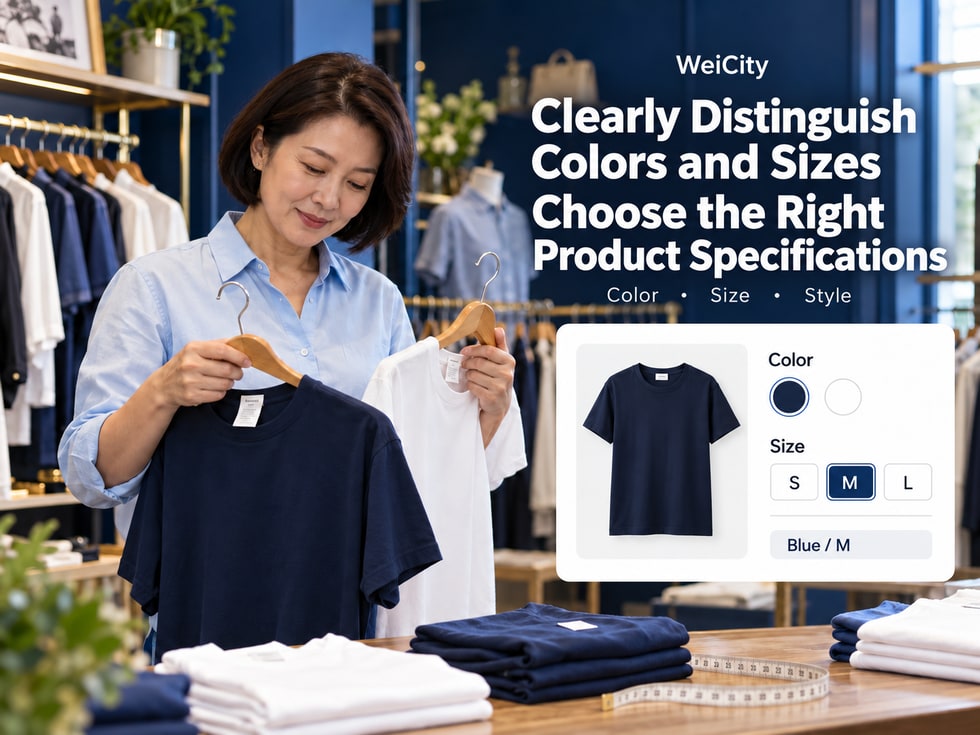
When the same product comes in different colors, sizes or styles, how should customers be able to choose?
For example, a top is available in:
🔵 Blue.
⚪ White.
📏 Sizes S, M and L.
If the product description only says "multiple colors and sizes available," customers may still need to contact the merchant to ask one by one what options exist, whether they are in stock, and the price for each variant.
For merchants, the following problems can also easily occur:
❌ The customer did not specify the color they need.
❌ The order is missing size information.
❌ Prices for different variants are entered incorrectly.
❌ Product images do not match the actual style.
❌ Sold-out variants are still mistakenly seen as available to buy.
The product variant feature in WeiCity Shop can help merchants organize colors, sizes, capacities and styles based on the options supported by the current product editing page, so customers can more clearly choose the version of the product they need.
This article introduces variant names, variant options, variant combinations, size descriptions, image matching, price and inventory management, and key points to check before publishing.
Product variants (Product Variants) are used to distinguish different versions of the same product.
When organizing products, you can first understand three basic concepts.
A variant name is an item that customers need to choose.
For example:
🎨 Color.
📏 Size.
☕ Capacity.
👜 Style.
📦 Package quantity.
A variant option is a specific choice under each item.
For example:
Variant name: Color
🔵 Blue.
⚪ White.
⚫ Black.
Variant name: Size
📏 S.
📏 M.
📏 L.
A variant combination is the specific product version that the customer ultimately chooses.
For example:
🔵 Blue + S.
🔵 Blue + M.
🔵 Blue + L.
⚪ White + S.
⚪ White + M.
⚪ White + L.
Two colors and three sizes can theoretically form six combinations.
Calculation:
2 colors × 3 sizes = 6 variant combinations.
However, this does not mean the merchant must offer all six combinations.
Which versions are actually supplied should be decided based on the product.
Because each answers a different question.
Variant name: What does the customer need to choose?
Variant option: What choices does each item have?
Variant combination: Which version does the customer ultimately choose?
📌 Understanding variant names, options and combinations before setting up products makes it easier to avoid messy information.
Not all product information needs to become a variant.
Generally speaking, differences that affect the product the customer actually receives, and that require a choice at the time of purchase, are suitable for organizing as product variants.
Can be set as:
🎨 Color: black, white, blue.
📏 Sizes: S, M, L, XL.
Can be set as:
☕ Capacity: 350ml, 500ml, 750ml.
🎨 Color: black, white, blue.
Can be set as:
📏 Size: Small, Medium, Large.
🎨 Color: Off-white, Dark blue.
👜 Style: Zipper style, Open-top style.
Can be set as:
📏 Size: Small, Large.
🎨 Color: White, Gray.
📦 Packaging: Single piece, Two-piece set.
Can be set as:
🎨 Packaging color.
🎁 Gift box style.
📦 Set combinations.
If all product versions are the same, the information can be placed in the product description.
For example:
🧵 Material.
🧼 Cleaning method.
📋 Usage instructions.
⚠️ Precautions.
If an insulated bottle only differs in capacity and color, you can set:
🎨 Color.
☕ Capacity.
Meanwhile, the material, cleaning method and usage instructions can be written uniformly in the product description.
📌 Product variants should be used to distinguish the versions that can actually be selected. It is not necessary to turn every product feature into an option.
Before filling in variants in WeiCity Shop, it is recommended to first list the product versions you actually offer at present.
This helps avoid a mismatch between the combinations the system lists and what is actually supplied.
Product: Desktop Storage Box
Color:
⚪ White.
🩶 Gray.
Size:
📏 Small.
📏 Large.
Theoretically, the following may appear:
⚪ White + Small.
⚪ White + Large.
🩶 Gray + Small.
🩶 Gray + Large.
But suppose the merchant does not actually offer the gray large version.
Then this combination needs to be handled correctly according to the current product editing features.
✅ Which variant names are there?
✅ Which options are under each variant?
✅ Which combinations are actually supplied?
✅ Which combinations are not offered?
✅ Which combinations are temporarily sold out?
✅ Are the prices consistent across different combinations?
These two situations are not exactly the same.
📌 Not supplied
The merchant does not offer this version in the first place.
For example:
The gray large storage box is not produced or sold.
📌 Temporarily sold out
The merchant offers this version, but there is currently no quantity available for sale.
For example:
The white large storage box has sold out, and it may be restocked in the future.
Because customers may judge from the page information whether it is worth waiting.
If a version is not supplied at all but is displayed as temporarily out of stock, it may cause misunderstanding.
How to deactivate combinations, hide options or mark items as sold out should be handled according to the features provided on the current WeiCity product editing page.
📌 Variant combinations should reflect actual supply, rather than treating every possible combination as a product available for sale.
Variant names and options should be specific, clear and consistent.
Recommendations:
🔵 Navy blue.
⚪ Off-white.
⚫ Black.
🩶 Light gray.
Avoid:
❌ Color 1.
❌ Color 2.
❌ As shown in picture.
Recommendations:
☕ 350ml.
☕ 500ml.
☕ 750ml.
Avoid:
❌ Small capacity.
❌ Medium capacity.
❌ Large capacity.
If you need to use size categories, it is also recommended to provide the actual capacity at the same time.
Recommendations:
📦 Single piece.
📦 Two-piece set.
📦 Three-piece set.
Avoid:
❌ Set one.
❌ Set two.
Recommendations:
👜 Zipper style.
👜 Open-top style.
👜 Multi-pocket style.
Avoid:
❌ Style A.
❌ Style B.
If the product itself uses model names such as A or B to distinguish versions, you may keep the model names, but you should explain the main differences.
For example:
🔧 Model A100.
🔧 Model A200.
You may add a note on the specification differences between the two in the product description.
For example:
Write the product option as "Off-white".
The image caption should also say "Off-white".
Do not write "Off-white" in one place and "Cream white" in another without explaining whether they are the same.
📌 Clear and consistent specification names help customers avoid mis-selection and make it easier for merchants to check orders.
For clothing, bags, furniture and storage products, size usually affects the customer's purchase decision.
However, simply writing:
📏 S.
📏 M.
📏 L.
does not fully explain the actual size of the product.
Depending on the product type, consider providing:
📏 Chest.
📏 Shoulder width.
📏 Length.
📏 Sleeve length.
For example:
Product: Men's Casual Top
S: Fill in according to the actual size chart.
M: Fill in according to the actual size chart.
L: Fill in according to the actual size chart.
Even within the same shop, size M may have different measurements for different cuts.
Therefore, do not directly copy the size chart from another product.
You may specify:
📐 Width.
📐 Height.
📐 Base depth.
📏 Handle length.
You may specify:
📐 External length.
📐 External width.
📐 External height.
📦 Where necessary, also provide the usable internal space.
For example:
🛏️ Bed sheet length and width.
🛋️ Applicable sofa cover size.
🪟 Curtain length.
If the product uses "One Size" or "Free Size", it is also recommended to provide the actual measurements.
For example:
📏 Length.
📏 Chest.
📏 Shoulder width.
✅ Use real measurement data.
✅ Units are clear.
✅ Measurement positions are clearly defined.
✅ The size chart corresponds to the current product.
✅ If there is a reasonable measurement tolerance, state it honestly.
📌 Size names help customers choose a version; actual size data helps customers judge whether it will fit.
When a customer selects a specification, they need to know which product version they are choosing.
Therefore, images and specification names should correspond to each other.
For example:
🔵 Blue → photos of the blue product.
⚪ White → photos of the white product.
⚫ Black → photos of the black product.
For example:
Zipper style
🔒 Show the zipper opening.
Open-top style
👜 Show the open-top structure without a zipper.
Multi-pocket style
📦 Show the internal and external pockets.
For example:
📦 Single piece.
📦 Two-piece set.
📦 Three-piece set.
Different sets should clearly state the quantity included.
For example, two tote bags may look almost identical.
But one has a zipper and the other does not.
In this case, you may add close-up photos of the bag opening so customers can see the difference.
You may use the current product editing features to set corresponding images for different specifications.
If specification images are not provided, you may also clearly indicate the corresponding style in the product images or description.
❌ The blue option uses a photo of the white product.
❌ A large-size product uses an image showing a small size.
❌ A two-piece set uses a photo of the three-piece packaging.
❌ Different styles use incorrect detail images.
📌 Images that match the specifications let customers clearly know which version they are choosing.
Different specifications of the same product may have different prices.
For example:
☕ 500ml thermos bottle.
☕ 750ml thermos bottle.
Because the capacities differ, the selling prices may also differ.
The following is hypothetical data, used only to illustrate how to manage specifications.
Product: Stainless Steel Insulated Cup
🔵 Blue + 500ml: RM29.
⚪ White + 500ml: RM29.
🔵 Blue + 750ml: RM39.
⚪ White + 750ml: RM39.
✅ Each specification combination has the correct selling price.
✅ Prices for different capacities are not mixed up.
✅ Check whether different colors have price differences.
✅ The product price is consistent with the actual sales arrangement.
For example:
The actual selling price for 500ml is RM29.
The actual selling price for 750ml is RM39.
But when entering the information, the two prices were accidentally swapped.
Customers may then see incorrect selling prices.
For example:
Black M: RM35.
Black L: RM35.
White M: RM35.
White L: RM35.
You still need to check whether the product page displays the correct information.
📌 Check each product specification price one by one to ensure the version a customer selects matches the amount displayed.
Different specifications of the same product may have different stock quantities.
For example:
A top is available in black and white.
However, the stock of black M and white M is not necessarily the same.
Product: Men's Casual Top
⚫ Black + M: 10 pieces.
⚫ Black + L: 8 pieces.
⚪ White + M: 5 pieces.
⚪ White + L: temporarily sold out.
The above is hypothetical data only.
📦 How many items are actually in stock for each combination.
🏷️ Whether it corresponds to the correct product number.
💰 Whether it corresponds to the correct price.
🎨 Whether it corresponds to the correct color.
📏 Whether it corresponds to the correct size.
The exact timing of inventory deduction may depend on order and payment status.
For example:
🛒 Customer submits an order.
💳 Customer completes payment.
❌ Order is canceled.
↩️ Product is returned.
Different systems may apply different inventory handling rules.
Therefore, merchants should confirm how inventory is deducted, reserved and restored based on WeiCity's current features.
For example:
The product has 20 pieces in total.
However, among them:
Black M: 10 pieces.
Black L: 5 pieces.
White M: 5 pieces.
If one specification has sold out, this does not mean other specifications have no stock.
📌 If the current Shop supports managing inventory by specification, make sure the quantity of each combination matches the actual supply.
An SKU (Stock Keeping Unit) is commonly used to distinguish different products or combinations of specifications.
For example, a top has:
🎨 Black and white.
📏 M、L.
Merchants may assign codes to different combinations according to their actual management needs.
Product: Men's Casual Top
⚫ Black + M: TS-BLK-M.
⚫ Black + L: TS-BLK-L.
⚪ White + M: TS-WHT-M.
⚪ White + L: TS-WHT-L.
These codes are only examples and are not a fixed coding rule of WeiCity.
🏷️ Distinguishing product versions.
📦 Checking inventory.
🛒 Identifying products in orders.
🔄 Handling returns and exchanges.
📊 Organize product information.
Specification: Lets customers know what choices are available.
Specification combination: Represents the specific version chosen by the customer.
SKU: Helps merchants identify and manage this version.
For example:
Customer selection:
"Black + M"
Merchants can check the specific product through the corresponding SKU.
Please refer to the fields and rules on the current WeiCity product editing page.
📌 SKUs mainly serve product management, while product options mainly help customers make their selections.
After preparing your product specification information, you can fill it in based on the features actually provided on the current product editing page.
The following is a general sequence of steps.
For example:
🎨 Color.
📏 Size.
For example:
Color:
🔵 Blue.
⚪ White.
Size:
📏 S.
📏 M.
📏 L.
For example:
🔵 Blue + S.
🔵 Blue + M.
🔵 Blue + L.
⚪ White + S.
⚪ White + M.
⚪ White + L.
Check each combination against its actual selling price.
For example:
📦 Inventory quantities.
📅 Booking conditions.
⚠️ Combinations that are temporarily sold out.
Provide images for products or specifications according to the features actually available.
For example:
👕 Clothing size chart.
👜 Bag length, width and height.
☕ Capacity information.
After saving, review the product page from the customer's perspective.
The specific entry points, the number of specifications that can be set, how combinations work, how images are matched, and the price and inventory fields are all subject to the current WeiCity product editing page and the features you have enabled.
📌 Organizing specifications first, then entering combinations and prices, can help reduce errors during listing.
After product specification setup is complete, you should not only check the product editing page.
If the current product supports shopping carts and ordering, you should also check the results of the customer's actual selections.
For example:
🔵 Blue.
For example:
📏 M.
Confirm that the amount shown on the page corresponds to the blue size M.
Confirm whether this combination can be purchased.
If the current feature supports it, check whether the correct product appears in the cart.
For example:
Product: Men's Casual Top
🎨 Color: Blue.
📏 Size: M.
🔢 Quantity: 1.
💰 Price: Corresponds to the current selling price.
Even if the product editing page is filled in correctly, that does not mean all actual display results have been checked.
For example:
❌ The customer selects blue, but the cart shows white.
❌ The customer selects size L, but the order details show size M.
❌ The product price does not match the specification.
These issues should all be checked before formal promotion.
📌 The ultimate goal of product specifications is to let customers choose clearly and let merchants receive clear order details.
Product specifications are not only for clothing.
Merchants of different types can organize selection items according to the actual characteristics of their products.
🎨 Color.
📏 Size.
👕 Fit.
🎨 Color.
📏 Shoe size.
👟 Style.
☕ Capacity.
🎨 Color.
📦 Package quantity.
📏 Dimensions.
🎨 Color.
👜 Style.
📏 Size.
🎨 Color.
📦 Set quantity.
📏 Dimensions.
🎨 Color scheme.
🧵 Material.
🎁 Gift box style.
🎨 Packaging color.
📦 Set combinations.
🔧 Model.
📏 Specifications.
📦 Package quantity.
No.
For example:
A cup may only need color and capacity.
A piece of clothing may need color and size.
A tool may only need a model.
📌 Product specifications should be designed according to the actual product, rather than adding options just to have more.
Product specifications should first help customers accurately choose a product.
Clear product names, specification descriptions and related information can also improve how easily a product page is understood.
For example:
“500ml Stainless Steel Thermos”
For example:
"Color: Dark blue"
"Capacity: 500ml"
For example:
Length, width, height or capacity.
For example:
What the difference is between 350ml and 500ml.
For example:
Use the matching blue product photo for blue items.
Adding colors, sizes or SKUs does not guarantee that search engines will create separate search results for each combination.
Whether a page is crawled, indexed or ranked also depends on platform technical settings, page structure, content quality and other factors.
📌 The primary goal of product specifications is to help customers choose; SEO should be built on accurate and clear product information.
Product specifications are used to distinguish different colors, sizes, capacities or styles of the same product.
A specification name is a selection category, such as "Color."
A specification option is a specific choice, such as "Blue."
A specification combination is a specific product version formed by multiple options, such as "Blue + M."
The specific number and combination limits are subject to the current WeiCity product editing page.
Not necessarily.
If a product has only one fixed version, it may not need additional specifications.
Please confirm based on the current product type and editing features.
Whether inventory can be managed by specification depends on the current Shop features.
If the current product editing page supports specification images, you can set them according to the actual features.
Handle it correctly according to the current features to avoid customers mistakenly thinking it can be purchased.
No.
Temporarily sold out means there is currently no quantity available for sale.
Out of supply means the merchant does not offer that version in the first place.
It is recommended to also provide actual size data to help customers judge fit.
Specifications help customers choose a product version.
SKUs help merchants identify and manage products.
Specific editing permissions and steps are subject to the current product management page.
It is recommended to check the actual selection and cart display results for the current product.
Not necessarily.
Set specifications according to the product versions you actually supply, and avoid adding unnecessary choices.
📌 The key to product specifications is letting customers know what they have chosen and letting merchants know which version they should provide.
✅ Names are clear.
✅ Related to product features.
✅ Easy for customers to understand.
✅ Colors are accurate.
✅ Sizes are complete.
✅ Capacities are correct.
✅ Styles are easy to distinguish.
✅ Combinations actually supplied have been organized.
✅ Combinations not supplied have been handled correctly.
✅ Temporarily sold out combinations have been checked.
✅ Each combination has the correct price.
✅ Different specifications are not confused.
✅ Available quantities are accurate.
✅ Inventory matches specifications.
✅ Colors and images are consistent.
✅ Different styles are clearly explained.
✅ Set contents are accurate.
✅ Actual sizes are correct.
✅ Units are clear.
✅ The size chart corresponds to the current product.
✅ Product numbers are easy to identify.
✅ Different combinations are not mismatched.
✅ Specification selection is correct.
✅ Price display is accurate.
✅ The cart shows the correct version.
✅ Options are easy to read.
✅ Images are clear.
✅ The selection flow matches the current features.
📌 After completing product specification setup, it is recommended to make a selection yourself as a customer would, and check whether the product, price and cart details are consistent.
The purpose of product specifications is not just to let customers choose a color or size on the page.
More importantly, it ensures that every choice is backed by clear product information.
🎨 Specification name: Lets customers know what they need to choose.
📋 Specification options: Display the colors, sizes and styles that are actually available.
📦 Specification combination: Confirms the final version the customer selects.
📏 Size details: Help customers judge whether the product fits.
🖼️ Matching image: Lets customers clearly see the different versions.
💰 Specification price: Ensures the amount corresponds to the correct product.
📊 Inventory information: Reflects actual supply.
🏷️ SKU number: Helps merchants identify different product versions.
🛒 Cart check: Confirms that the specification the customer selects is displayed correctly.
The value of WeiCity product specifications is that they help merchants organize different product versions clearly, make it easier for customers to choose, and make it easier for merchants to verify orders.
For customers:
There is no need to repeatedly ask which colors and sizes are available.
For merchants:
There is no need to rely on vague chat records to guess which version a customer wants.
🎨 Clear options make it easier for customers to choose.
📏 Clear sizes make it easier for customers to judge.
📦 Accurate combinations make it easier for merchants to manage.
🛒 Complete order information keeps follow-up handling organized.
Organize item by item, from specification names and options to specific combinations, then check images, prices and supply, so the product selection process is clearer.
The exact number of product specifications, combination methods, specification images, SKUs, inventory and cart features depend on WeiCity's current product editing page, merchant settings and the services you have activated.
👉 Open WeiCity: https://wei.city/