

29 📱 What Are the Benefits for Merchants of Web, Mobile, and App Access?
🔗 The same merchant channel connects desktop browsing, mobile links, and App interaction, making it easier for customers to open, discover, contact, and order
When customers get to know a shop, they may search on a computer, click a link in a mobile chat, or browse local merchants directly through an App. WeiCity offers both web and mobile App entry points so merchants can reach customers with different habits through one channel. This article explains which scenarios suit the web, mobile browsers, and the App, and how multiple entry points help merchants lower access barriers, increase local discovery, handle chats and orders, and improve day-to-day operating efficiency.
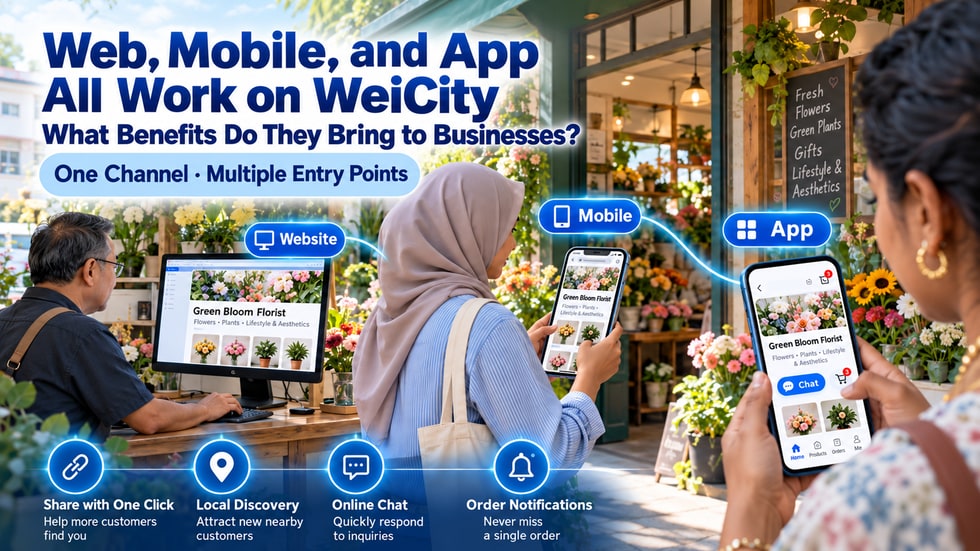
Some customers prefer to search for merchants on a computer.
Some customers click links from chat apps or social content.
Others prefer to use the App to browse nearby shops, view products, receive notifications and contact merchants.
If a merchant prepares for only one of these ways of using WeiCity, other customers may find it inconvenient.
Therefore, the real value of being able to reach the same merchant channel from multiple devices is not just that the content appears on different screens, but that different customers can choose the way of accessing it that they are most comfortable with.
A web entry point means customers open the merchant channel through a web browser.
Customers can enter a web address in a computer, tablet or mobile browser, or click a link shared by the merchant directly.
The main features of a web entry point include:
• Customers usually do not need to install the App first
• They can go straight in through a link
• Suitable for search results, social profiles and digital business cards
• Detailed information can be viewed on a large computer screen
• Suitable for reading longer brand introductions, articles and product descriptions
• Makes it easy for merchants to share specific pages with customers
For customers encountering a merchant for the first time, the web is usually an entry point with a lower barrier to access.
Mobile web also opens through a browser, but it is more suited to use on the move.
Customers may open the channel in situations such as:
• Checking business information while passing a shop
• Receiving a merchant link in a chat
• Clicking a product introduction from social content
• Looking for nearby services while out
• Comparing products, menus or prices
• Needing to quickly check the address and contact details
The focus of mobile web is speed and clarity.
Customers usually will not read very complicated instructions on a small screen, so merchants should place the most important information where it is easy to see.
According to the current official app store information, the WeiCity App includes features such as channels and content, local merchant and product discovery, ordering, order management, instant chat and related notifications.
The App is more suitable for ongoing use and interactive scenarios, such as:
• Browsing local merchants and products
• Following people or channels of interest
• Reading content published by channels
• Buying products or submitting food orders
• Viewing order-related information
• Chatting with merchants
• Receiving notifications about replies, interactions or order updates
The web lets customers get in quickly, while the App can give customers who already know WeiCity a more continuous interactive experience.
The features available may vary by operating system, device, region, account and App version. Please rely on what is currently displayed when using them.
If a customer only wants to learn about a merchant for the first time but must first install an app, register an account and complete several steps, some customers may leave during the process.
A web link allows customers to first view the merchant's public introduction, content and product information.
Merchants can first let customers learn the following:
• What kind of merchant is this?
• What products or services are offered?
• What are the business hours?
• Where is the shop located?
• How can I get in touch?
• What should I do next: browse, ask a question, or place an order?
When customers need more ongoing features, they can then use the App as needed.
This sequence feels more natural than requiring every customer to install the App from the start.
A merchant channel link can serve as a unified online entry point.
Merchants can use the link in:
• Social media account profiles
• Automatic replies in chat apps
• Digital business cards
• Email signatures
• Product packaging
• Receipts and flyers
• In-store posters
• Event registration materials
• Partner introduction pages
Whether customers use a computer or a mobile phone, they can first use the link to enter the most suitable page.
Merchants do not need to send brand introductions, product images, business hours and contact methods separately each time.
WeiCity's official app materials list local merchants, products, and city or area discovery as key use cases.
For merchants, this means a channel can be shared by you and also has the chance to be seen by customers in the platform's local content and merchant browsing experiences.
Merchants can use the following materials to help customers understand their channel:
• A clear merchant name
• An accurate location or service area
• A representative channel cover
• A simple and clear business introduction
• Complete product, menu, or service information
• Ongoing publication of relevant local content
Using multiple devices will not automatically bring in customers, but it can increase the chances that customers who find you can smoothly enter your channel.
After seeing a merchant's information, customers often have more questions:
• Is the product still in stock?
• Can I make an appointment?
• Are you open today?
• Can you deliver to my area?
• Can I choose another size or color?
• When can the order be completed?
The web page helps customers first learn the basic information, and the chat and interaction features in the App can carry further communication.
Merchants should first write answers to common questions in the channel, then use contact entry points to handle matters that need individual confirmation.
This reduces repeated answers and helps customers get the information they need more quickly.
Customers do not necessarily start by visiting a merchant's product page.
Some customers may first see an article, a picture, a video, or a local recommendation, and only later enter the merchant channel to look at products.
Multiple entry points can form a more complete customer path:
• Customers discover content through the web or the App
• They enter the merchant channel to learn about the brand
• They view products, menus, courses, or services
• They submit an order or take the next step through the relevant feature
• They contact the merchant when needed
• They check related updates or continue interacting through the App
The clearer the connections between content, brand, and transaction entry points, the less likely customers are to get lost along the way.
Different business tasks suit different devices.
A computer is better suited for:
• Writing longer articles
• Organizing large amounts of product information
• Checking images and page structure
• Referring to multiple files at the same time
• Concentrating on tasks that require a lot of text input
A phone is better suited for:
• Quickly checking how the channel appears
• Organizing content after taking photos in the store
• Checking items that need follow-up at any time
• Sending the channel link to customers
• Checking the mobile page as customers actually see it
The App is better suited for:
• Handling interactions in mobile situations
• Checking chats or related notifications
• Browsing platform content and local merchants
• Handling orders and channel matters based on the features currently available
Merchants do not need to insist on completing all work on the same device; they should choose the tool that best fits the current task.
If a merchant sets up a desktop website, a mobile page, and multiple App pages without unified management, the following problems can easily occur:
• The desktop page shows an old price
• The mobile page still shows past business hours
• A social media profile uses a phone number that has been discontinued
• Product images and descriptions do not match
• Customers see different offers at different entry points
Merchants should treat the WeiCity merchant channel as their main public information source and regularly check how it appears at each entry point.
The same channel is displayed differently for different entry points, which does not mean every screen and feature will be exactly the same, but core brand information should stay consistent.
A web page usually requires customers to actively open it again.
With the appropriate permission, the App can use notifications to remind users of new replies, interactions, or order updates.
The value for merchants includes:
• Customers are more likely to notice important replies
• Order updates do not depend entirely on manual checking
• Users who follow the channel can keep seeing its content
• Merchants gain more opportunities to interact again with returning customers
Notifications should be used only for truly important information.
If content is too frequent or irrelevant to customers, users may turn off notifications.
Customers getting to know the merchant for the first time:
• Arrive from search, a shared link, or a mobile web page
• First learn about the brand, address, and main products
Customers who are ready to buy:
• Go directly to the product, menu, or service page
• Check prices and related details
Customers who often use WeiCity:
• Browse merchants and content through the App
• Follow channels, chat, or check order-related updates
Returning customers:
• Save the channel link or find the merchant again in the App
• Check new products, articles, and promotions
Merchants do not need to force all customers down the same path; they only need to make sure every path leads to a clear next step.
After a channel is published, do not only check it on your own computer.
It is recommended to complete the following tests:
• Open the channel homepage in a desktop browser
• Open the shared link in a mobile browser
• Check which public information is visible when not logged in
• Search for or open the channel in the App
• Check whether the channel cover displays completely on different screens
• Check whether titles are too long on a phone
• Tap the phone number, address, and contact entry points
• Open a product, menu, course, or work
• Test the corresponding ordering or contact process
• Check that text, buttons, and prices are clear
• Check the basic experience separately on Wi-Fi and mobile networks
• Confirm that old links still lead to the correct content
When problems are found, fix the parts that affect customer actions first.
Most customers may first get to know a merchant on their phone, so content should be easy to read on small screens.
You can do the following:
• Make titles state the key point directly
• Answer the customer's most important question in the first paragraph
• Keep each paragraph short
• Use clear bullet points
• Keep product images bright and clear
• Do not hide prices, times, and addresses at the end of long text
Set only one main action per page
• Keep contact and purchase entry points easy to find
• Check it yourself on a phone after publishing
A clear mobile display usually also makes reading on computers and tablets easier.
The web, mobile browser, and App may display content differently and have different feature focuses.
Merchants should avoid these misunderstandings:
• Do not assume every feature works exactly the same on all devices
• Do not assume customers have already installed the App
• Do not test only your own phone model
• Do not assume traffic will come naturally after publishing a channel
• Do not ignore App and browser version updates
• Do not keep long-term login status on shared computers
• Do not handle sensitive business information on unsafe devices
If a feature is very important to your business, test the actual web and App processes separately.
Day 1: Complete the channel homepage and main merchant information.
Day 2: Use a computer to check the brand, article, and product pages.
Day 3: Use a mobile browser to check titles, images, and buttons.
Day 4: Send the channel link to testers through a chat app.
Day 5: Use the WeiCity App to find the channel and test the available features.
Day 6: Ask customers of different ages and devices to complete one task.
Day 7: Fix the most common problems and confirm the main promotion link.
After completing these seven days of testing, merchants can more clearly see where customers enter and at which step they need help.
Merchants can record:
• How do customers mainly enter?
• Are there more mobile visits than computer visits?
• Which type of content most easily leads to inquiries?
• Can customers easily find the contact entry point?
• Which pages often have the same problems?
• Are customers willing to open the channel again?
• Do App users chat or interact on an ongoing basis more often?
These real-world observations can help merchants improve the channel, rather than designing pages based only on personal habits.
The advantage of the web is that links are easy to open and share.
The advantage of the mobile web is that customers can view merchant information at any time.
The advantage of the App is that it brings local discovery, channel content, chat, orders, and notifications together in a mobile experience for ongoing interaction.
The three entry points do not replace one another; they serve different stages of the customer journey.
Make it easy for first-time visitors to open your page, easy for customers ready to buy to take action, and easy for returning customers to find you again. This is the practical value that web, mobile and App access can bring to your business.
📌 Friendly Reminder
This article is compiled from the official WeiCity website and publicly available information from app stores. Actual features on web, mobile browsers and the App may vary by device, operating system, region, account, plan and version. Please refer to the current page and the latest app version display.