

25 🌱 Try First, Then Upgrade: How Can Merchants Start Using WeiCity at Low Cost?
🚀 Start with the RM0 trial version, complete a minimum viable channel first, and then decide on an upgrade based on real business needs
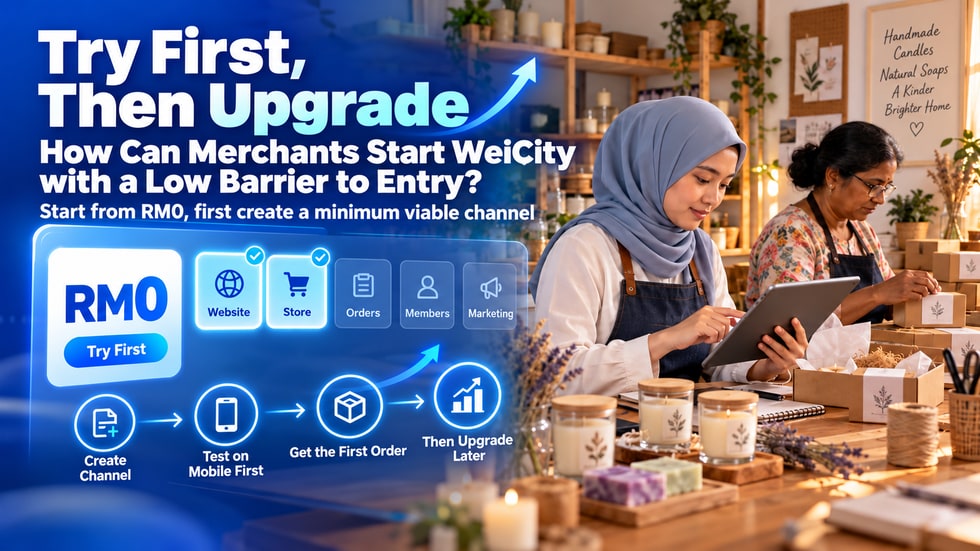
Building an online channel does not necessarily require a large budget at the start. According to WeiCity's official information, merchants can start with the RM0 trial version and try five functional modules and online payments. This article explains how to first complete a minimum viable merchant channel, test the customer experience, record actual usage, and then decide whether to upgrade once there is a clear need for orders, content, team collaboration, or other business features.
Many merchants want to build their own online channel but keep delaying, often because they worry about high costs, do not know which features to choose, do not have time to prepare a lot of content, or believe they must finish organizing all products and materials first.
In fact, merchants do not need to build a very complete website with very complex features on the first day.
A more practical approach is to first complete a minimum viable channel that customers can open, understand, contact you through, and possibly try ordering from.
A minimum viable merchant channel means first including the basic information needed for your business, so customers can complete a clear action.
It does not need to include all features at once, nor does it need to upload all products immediately.
A merchant channel ready for testing usually only needs the following:
• A clear merchant name and profile picture
• A short introduction explaining what products or services you offer
• Business hours, service areas and contact methods
• One main feature module that best suits your current business
• One representative product, menu item, service or work
• One clear customer action, such as contacting, booking, ordering or paying
According to the information currently published by the WeiCity official channel, merchants can start with the RM0 Trial Edition and try five feature modules, namely website, Shop, Online Ordering, video courses and Gallery, as well as online payment collection.
The value of the trial edition is not only saving costs at the beginning. More importantly, it allows merchants to first confirm three questions:
• Can customers understand your channel?
• Do the existing features suit the way you operate?
• Which features are truly needed, and which are not needed for now?
Testing first and then deciding based on actual conditions can reduce unnecessary investment.
Before creating a channel, choose one most important customer action first.
Do not, from the start, require customers to read the brand story, watch videos, browse all products, become members, claim offers and complete payment.
The more choices customers have, the more likely they are to not know what to do next.
You can start from one of the following goals:
• If you want customers to learn about your brand and contact you, you can use the website feature first
• If you want customers to select products and place orders online, you can use the Shop feature first
• If you want customers to view the menu and submit food and beverage orders, you can use the Online Ordering feature first
• If you want customers to watch structured teaching content, you can use the video course feature first
• If you want customers to view works, cases or service results, you can use the Gallery feature first
After choosing one main goal, all other content should help customers complete this action.
When creating a merchant channel for the first time, you do not need to prepare dozens of pages of content at once.
You can complete the basic setup in the following order:
• First 10 minutes: Fill in the merchant name, profile picture and one core introduction sentence
• Minutes 10 to 20: Add information about the merchant, business hours, address, service areas and contact methods
• Minutes 20 to 35: Choose one main feature module and add one representative item
• Minutes 35 to 45: Upload a clear cover image, product photos or work photos
• Minutes 45 to 55: Use a mobile phone to check text, images, buttons and the operation flow
• Last 5 minutes: Send the channel link to a familiar customer or friend for testing
The goal at this stage is not to make it as complete as possible, but to make the channel genuinely usable.
Merchants see the back-end settings, but customers see the actual user experience.
After the channel is published, you can treat yourself as a customer who is seeing this shop for the first time and complete a full test:
• Open the channel on a mobile phone and check whether loading and display are clear
• Check whether customers can quickly understand what you offer
• Tap the phone number, contact button or map location
• Open a product, menu item, course or work item
• If the related features are enabled, test adding to cart, submitting orders and the online payment process
• After completing the actions, check whether customers know what to do next
If you are already familiar with the channel, it is easy to overlook problems. For this reason, you can also ask someone who did not help set it up to test it, and observe where they stop or have questions.
Do not judge whether the channel is effective based only on page views from its first day online.
It is recommended to run it for a period of time and record the real problems customers encounter:
• What information do customers ask about most often?
• Which products, menu items, or service items are viewed most often?
• At which step do customers give up on contacting you or placing an order?
• Do customers often ask about prices, business hours, delivery, or payment methods?
• Do you often need to update content and products?
• Have you started needing several staff members to manage the channel together?
These real situations are more helpful than guesswork in deciding which features you need next.
If the basic information of your channel is still incomplete, an upgrade usually will not solve business problems automatically.
In the following situations, you may want to keep refining and testing first:
• Your business introduction, contact methods, or business hours are incomplete
• You have not yet uploaded any products, menu items, courses, or works
• You have not yet completed one customer flow test on mobile
• You have not yet shared the channel link with real customers
• You are not clear about the specific problem an upgrade would solve
• You believe more features are better simply because you have seen more of them
Actually using the existing features is usually more important than adding more features too early.
When a merchant has begun to use the channel steadily and has clear business needs, it is worth comparing the current WeiCity merchant plans.
Common upgrade signals include:
• You need to operate an online channel over a longer period in a stable way
• The number of products, orders, courses, or content keeps growing
• You need to use more features that suit your business processes
• Several staff members are starting to take part in managing products, content, or orders
• Online payments and orders have become part of daily business operations
• You need to connect brand presentation, sales, and customer service more fully
An upgrade should address a real problem, not make the channel look more complex.
When comparing plans, do not look only at how much you pay each month; also consider whether it can reduce other business costs.
You can evaluate from the following angles:
• Does it reduce the time spent repeatedly answering customer questions?
• Does it make it easier for customers to find product and service information?
• Does it reduce the steps needed to confirm orders across multiple chat apps?
• Does it bring brand introduction, products, content, and payments together in one place?
• Does it help you reduce the cost of using multiple separate tools?
If a plan saves time, reduces errors, or brings more valid orders, the value it creates may exceed the cost of the plan itself.
• Turning on all modules at once without the time to manage them
• Uploading a large number of products at once, but with incomplete information, prices, or images
• Waiting for perfect brand photos and copy, so the channel never goes live
• Checking only on a computer without testing on a mobile phone
• Having no clear contact, booking, or purchase entry point in the channel
• Not proactively sharing the channel link with customers after launch
• Observing for only a day or two and concluding that the channel is not working
Starting with a low barrier does not mean starting carelessly; it means first focusing on completing the most important parts.
Day 1: Create the channel and fill in your business name, introduction, and contact information.
Day 2: Choose the main feature module that best suits your business.
Day 3: Add one representative product, menu item, course, service, or work.
Day 4: Complete the cover, images, prices, and descriptions.
Day 5: Test the browsing, contact, ordering, or payment process on a mobile phone.
Day 6: Invite three to five familiar customers or friends to try it and collect their feedback.
Day 7: Fix the most frequently occurring problems and formally share the channel link.
After seven days, you will have your first batch of real feedback, instead of staying at the stage of ideas.
• Is my basic merchant information complete?
• Can customers quickly understand what I offer?
• Has anyone already contacted me or placed an order through the channel?
• What specific feature do I need to upgrade for?
• How much time could this feature save, or which tasks could it reduce?
• Am I able to keep updating and managing any newly added features?
• Are the current plan, price, and terms of use suitable for my stage of business?
If these questions have clear answers, the decision to upgrade will be more sound.
Building your own online channel does not necessarily require a high budget or complex features from the start.
A more reliable approach is to use the RM0 Free Trial to complete a minimum viable channel, so customers can actually open it, browse it, contact you, and test the operating process.
Once you start receiving views, inquiries, orders, and customer feedback, you can then choose a plan that suits your current stage of business.
Starting allows you to discover what truly needs improvement; testing lets you know which features are worth investing in.
📌 Friendly Reminder
This article is compiled from the public information currently available on WeiCity's official channel. Platform features, plan details, and prices may change; before upgrading, please refer to the plan page displayed in real time on WeiCity.