

20 🎨 Products come in different sizes, colors, and specifications. How should they be sold online?
📦 Use clear product options, separate SKUs, and inventory management so customers choose the right style and merchants make fewer mistakes
💡 The same product may come in different colors, sizes, capacities, or styles. If each option is created as a separate product, customers find it hard to compare and merchants easily mix up orders and inventory. WeiCity Shop supports up to three option groups and one hundred SKUs, and can automatically deduct and restore inventory. This article explains how to plan product specifications, calculate combination counts, and organize images and inventory so multi-specification products are easier to sell online.
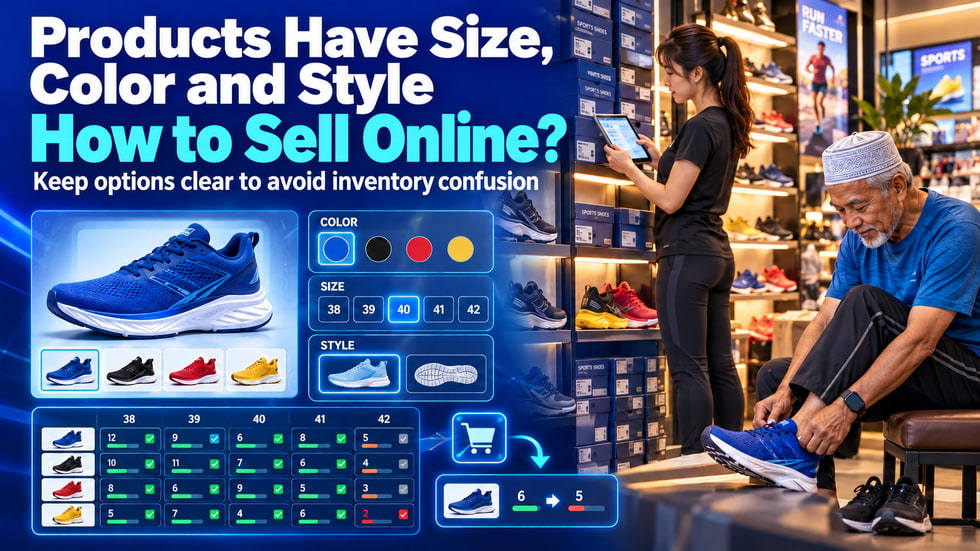
Many products do not come in just one fixed option.
A piece of clothing may come in different colors and sizes.
A pair of shoes may come in different styles, colors and sizes.
A care product may come in different volumes and fragrances.
If a merchant lists all the options in the product description and then asks customers to tell them which one they want through chat, mistakes can easily happen.
Customers may forget to specify a size, and the merchant may pick the wrong color.
A clearer approach is to set colors, sizes and specifications as product options that customers can select directly.
Before setting up a multi-specification product, you need to distinguish three concepts.
📌 Product Option
A product option represents a category that customers need to choose from.
For example:
• Color
• Size
• Volume
• Style
• Fragrance
• Pack quantity
🎨 Option Value
An option value represents a specific choice within a category.
For example:
Color:
• Blue
• Black
• Red
• Yellow
Size:
• S
• M
• L
• XL
Volume:
• 250ml
• 500ml
• 1L
🏷️ SKU
When different options are combined, they form a specific product combination, which is called an SKU.
For example:
• Blue + Size M
• Black + Size L
• Red + Size XL
These combinations may appear to belong to the same product, but their actual inventory can be completely different.
If a product page only says "Available in multiple colors and sizes, please contact the merchant to choose," customers need to send a separate message.
This may lead to the following problems:
• Customers forget to specify their choice
• Customers use different names to describe the same color
• Merchants overlook chat messages
• Customers choose a combination that is already sold out
• Order details do not clearly record the specifications
• The wrong product is packed
• Actual inventory is difficult to verify
Letting customers select options directly on the product page allows specifications to be clearly recorded in the order.
Customers know what they have chosen, and merchants can more easily prepare products according to the order.
Based on the features currently published by the official WeiCity channel, Shop products support:
• Up to three option groups
• Up to one hundred SKUs
• Multiple product images
• Automatic inventory deduction and restocking
Three option groups can already cover most retail products.
For example, a pair of running shoes can be set up with:
First option group: Color
Second option group: Size
Third option group: Style
A care product can be set up with:
Option Group 1: Capacity
Option Group 2: Fragrance
Option Group 3: Package Quantity
Just because the system allows three option groups does not mean you must use all three.
If a product only has color and size options, two option groups are enough.
The number of SKUs is not the sum of the options. It is the product of the number of options in each group.
For example:
There are four colors:
• Blue
• Black
• Red
• Yellow
There are five sizes:
• 38
• 39
• 40
• 41
• 42
The number of SKUs is:
4 colors × 5 sizes = 20 SKUs
If you add two more styles:
4 colors × 5 sizes × 2 styles = 40 SKUs
If a product combination exceeds one hundred SKUs, you need to reorganize it.
You may consider:
• Reduce unnecessary choices
• Split products with very different styles into separate products
• Only list combinations that are actually in stock
• Change special custom styles to require contacting the merchant for confirmation
Calculate the number of combinations before setting up, so you do not discover halfway through that the structure is too complex.
Options should be based on what customers actually need to decide when buying.
You can start by asking:
• What must the customer select before paying?
• Which choice affects what the merchant orders from suppliers?
• Which choice requires separate inventory management?
• Which difference is only product description and does not need customer selection?
Suitable as product options:
• Color
• Size
• Volume
• Style
• Model
• Pack quantity
Content that should not become options:
• Product material description
• Instructions for use
• Care instructions
• Delivery reminders
• Features that do not affect the order content
This information should be written in the product description, rather than added as a new specification option.
Option names must be simple, consistent, and easy to understand.
Recommended formats:
• Black
• Navy Blue
• Off-White
• Size M
• 500ml
• Set of Two
Avoid:
• Using abbreviations that only the merchant understands
• Using “Blue,” “Dark Blue,” and “Blue” together without explaining the difference
• Sometimes writing the size as M and sometimes as Medium
• Sometimes using ml for capacity and sometimes writing only the number
• Putting overly long explanations in option names
Products of the same type should use a consistent naming style.
This makes it easier for customers to choose and clearer for merchants when reviewing orders.
Products with multiple specifications need to clearly show customers the differences between choices.
You can prepare:
• Complete main product image
• Front-view photo of each color
• Comparison photos of different styles
• Material and detail photos
• Size reference photos
• Real-life usage scenarios
When photographing colors, try to use the same lighting, background, and angle.
If a blue product is photographed in natural light but a red product is photographed under yellow lighting, customers will find it difficult to compare them accurately.
Images should be clearly labeled with the corresponding color and style, either next to the image or in the product description.
Do not provide only one product photo when offering ten color choices.
Customers cannot try on or physically compare products online, so providing only S, M, and L is usually not enough.
Merchants can add:
• Actual product dimensions
• Measurement method
• Suitable range of use
• The size worn by the model or displayed product
• Possible differences from manual measurement
Size standards may vary between brands.
Do not assume customers will know whether “M” fits them.
For shoes, you can provide foot length as a reference.
For clothing, you can provide shoulder width, chest, garment length, or waist measurements.
For storage products, you can provide length, width, and height.
Clear size information can reduce wrong selections and returns and exchanges.
The total stock of a product does not mean every specification is in stock.
For example, a pair of shoes may have twenty pairs in total, but the actual breakdown could be:
• Blue, size 38: three pairs
• Blue, size 39: five pairs
• Blue, size 40: zero pairs
• Black, size 40: four pairs
• Black, size 41: two pairs
If the page only shows “fourteen pairs left,” customers may still select the sold-out blue size 40.
Therefore, merchants should check inventory according to the actual combinations.
You can start by making a simple list:
• Product name
• Color
• Size
• Style
• SKU number
• Actual inventory
• Inventory shown on the page
Checking each item before going live can reduce overselling.
According to official WeiCity information, Shop supports automatic inventory deduction and restocking.
After a customer purchases a particular SKU, the inventory for the corresponding combination can be automatically reduced.
If an order is canceled or inventory needs to be restored, the corresponding stock can also be added back.
This can help merchants:
• Reduce manual inventory adjustments
• Lower the risk of repeatedly selling out-of-stock products
• Learn more quickly which combinations are about to sell out
• Keep track of inventory for different colors and sizes separately
Automatic management does not mean merchants never need to check.
If physical stores and online stores share inventory, you still need to promptly update quantities sold in person.
Merchants should also regularly compare system inventory with actual inventory.
Some products change in price depending on capacity, material, or package quantity.
For example:
• 250ml vs. 500ml
• Single pack vs. three-pack
• Standard version vs. upgraded version
Merchants should ensure that after customers select a specification, the corresponding actual price is clearly displayed.
Before official launch, test each combination one by one to confirm that the product settings, current prices, and checkout amounts match.
Do not only write “some specifications require an additional charge” in the product description and let customers discover the difference only after payment.
The clearer the price differences, the more customer misunderstandings can be avoided.
👕 Apparel Merchants
• Color
• Size
• Style
👟 Footwear merchants
• Color
• Shoe size
• Sole or version
🧴 Beauty and Personal Care Products
• Volume
• Fragrance
• Pack quantity
☕ Food and Beverage Products
• Portion size
• Flavor
• Packaging method
🎁 Gift Merchants
• Color
• Gift box size
• Packaging style
📱 Phones and Electronic Accessories
• Compatible models
• Color
• Bundle contents
🏠 Home and Storage Products
• Size
• Color
• Combination quantity
Each industry chooses options differently, but the principle is the same: only set options that affect customer purchases and merchant stocking.
You can follow these steps:
1️⃣ Confirm the base product
First confirm which choices truly belong to the same product.
2️⃣ List the necessary options
Decide on colors, sizes, capacities, or styles.
3️⃣ Calculate the number of SKUs
Multiply the number of options in each group and confirm that the total does not exceed the limit.
4️⃣ Standardize option names
Use text that customers can easily understand.
5️⃣ Organize actual inventory
Record the quantity for each combination.
6️⃣ Prepare product images
Show the main colors, styles, and important details.
7️⃣ Add size and specification information
Help customers judge which choice is suitable.
8️⃣ Test different combinations
Confirm that customers can smoothly select, add to cart, and check out.
Starting with a product that has fewer options makes it easier to become familiar with the entire setup process.
• Creating a completely separate product for each color
• Inconsistent option names
• Using internal codes that customers cannot understand
• Not calculating the total number of SKUs
• Sold-out combinations can still be selected
• Managing only total inventory without managing specific combinations
• Images do not indicate the corresponding color or style
• Sizes listed only as S, M, and L without size information
• Product description does not match the actual options
• Prices for different combinations have not been tested
• Online inventory is not updated after in-store sales
These mistakes can cause customers to choose incorrectly, merchants to ship the wrong items, or inventory to be oversold.
Merchants can select an actual product and simulate a customer purchase.
Check the following in order:
• Whether each option group is easy to understand
• Whether all options that should appear are complete
• Whether sold-out combinations are displayed correctly
• Do the product images match the selected options?
• Are the size and specification descriptions clear?
• Can the combined selection be added to the cart?
• Does the cart record the correct specifications?
• Is the product quantity correct?
• Is the checkout amount correct?
• Does the inventory change correctly after an order is completed?
It is best to test on a mobile phone, as most customers may browse and place orders on their phones.
• Are only the necessary option groups used?
• Are there no more than three option groups?
• Does the number of SKU combinations not exceed one hundred?
• Are the option names consistent?
• Does each combination have the correct inventory?
• Do the product images show the main colors and styles?
• Is a size or capacity description provided?
• Are the product prices clear?
• Are sold-out combinations handled correctly?
• Does the cart record the customer's selections?
• Is the checkout amount correct?
• Has the merchant completed a test order?
After completing the checks, then formally promote the product.
Multi-option products are not intimidating.
What really causes confusion is unclear option names, inventory that is not separated, and insufficient images and descriptions.
As long as you organize the product structure first and then set up choices by color, size, and specification, customers can make their decision directly on the product page.
Merchants can also see the exact combinations in orders, reducing repeated confirmations and wrong items being picked.
You may start by setting up a product with fewer color and size options.
After completing the test, gradually add other multi-option products.
👉 Use the WeiCity Merchant Channel to organize product options and inventory, so customers can choose clearly, merchants can process orders accurately, and online sales are easier to manage.