

19 🛒 From product display to online payment, one channel does it all
🚀 Let customers learn about products, add items to their cart, and pay in MYR from the same entry point, reducing redirects and drop-offs
💡 If customers have to leave for other pages to check prices, contact the merchant, confirm stock, or ask about payment methods after seeing a product, the purchase process can easily break off. WeiCity merchant channels bring together brand introductions, multiple product images, shopping carts, inventory handling, and online payment in one entry point, making the path from learning about a product to completing payment clearer and making it easier for merchants to manage online orders in a unified way.
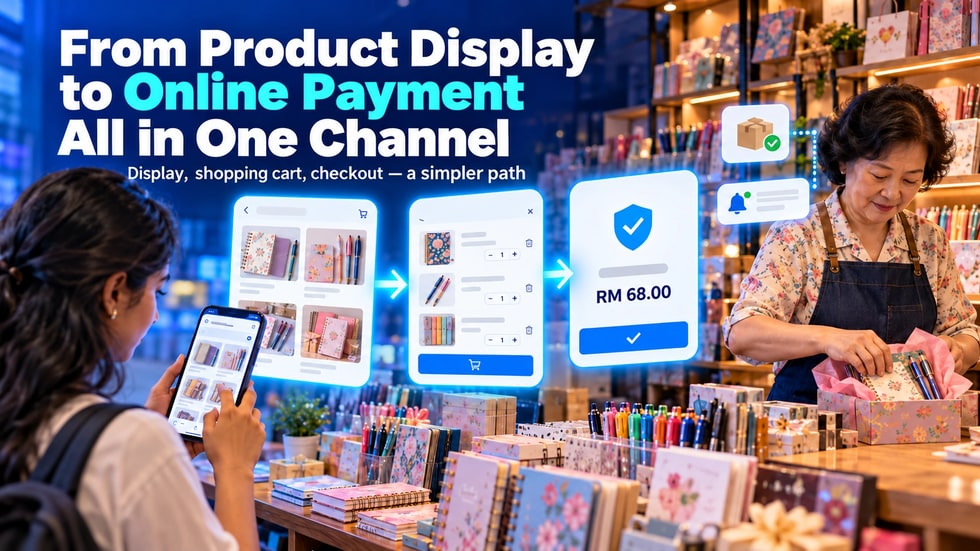
Many merchants already post products on social platforms.
However, when customers are ready to buy, the process can become complicated.
Customers first see a product in a post, then send a private message to ask about the price, wait for the merchant to confirm stock, request payment details, and finally send back a payment screenshot.
Merchants also need to check orders, payments, products, and customer details one by one.
If any step is not completed promptly, customers may give up on the purchase.
WeiCity Merchant Channel can bring product display, shopping cart, and online payment together in one entry point, making it easier for customers to go from "seeing the product" to "completing payment."
After seeing a product they like, customers usually want to quickly confirm:
• What the product is
• What the price is
• Whether it is in stock
• Which styles are available
• How to buy it
• Which payment methods can be used
• How they will receive the product after paying
Common reasons for drop-off include:
• The product post does not show complete information
• The price has to be requested through a separate private message
• The merchant does not reply promptly
• Customers do not know whether the product is in stock
• Payment details must wait for the merchant to send them
• Customers must switch between multiple apps
• Customers do not know whether their order has been received after payment
Reducing these steps can make the purchase process smoother.
WeiCity Merchant Channel lets you keep your official website and online store in the same channel.
Merchants can introduce their brand, publish content, display products, and use features such as Shop according to their business needs.
Customers do not need to browse an introduction page first and then search for a separate store link.
They can complete the following within the same merchant entry point:
• Getting to know the merchant
• Viewing the brand introduction
• Browsing products
• Reading product information
• Selecting the products they need
• Add to cart
• Entering the checkout page
• Completing online payment
The clearer the entry point, the easier it is for customers to remember and for merchants to share over the long term.
After entering the merchant channel, customers should be able to quickly find the main products.
Product displays can include:
• A clear product name
• Main product image
• Multiple detail photos
• Product purpose
• Price
• Stock status
• Key dimensions or capacity
• Material or main ingredients
• Instructions for use
• Delivery or pickup instructions
Do not upload only one photo and one price.
Customers cannot physically handle the product and need photos and text to judge whether it suits them.
Complete information reduces repeated questions and increases customers' confidence before purchasing.
The main image attracts attention, while other images provide supporting information.
You can display them in the following order:
1️⃣ First image: complete main product image
2️⃣ Second image: different angles
3️⃣ Third image: material or feature details
4️⃣ Fourth image: size reference
5️⃣ Fifth image: real-life usage scenario
6️⃣ Sixth image: packaging and included items
The clearer customers can see, the easier it is for them to judge whether the product meets their needs.
Product photos should closely match real colors and actual contents, and avoid excessive filters that could cause misunderstanding.
After deciding to buy, customers can add products to the shopping cart.
The purpose of the shopping cart is to let customers review the following before paying:
• Which products were selected
• The quantity of each product
• Product price
• Order total
• Whether the quantity needs to be changed
• Whether a certain product needs to be removed
Customers do not need to send each product name to the merchant one by one, nor wait for the merchant to calculate the total manually.
If a customer wants to buy several products, the shopping cart can make the whole process clearer.
For merchants, a structured order is also easier to handle than scattered information in chat.
When taking orders through private messages, merchants may need to record manually:
• Which products the customer is buying
• How many of each product are needed
• Product price
• Customer name
• Contact details
• Payment amount
• Delivery or pickup arrangements
Missing a single message may lead to wrong quantities, wrong amounts, or missing products.
The shopping cart brings the products and quantities chosen by the customer together in one order, reducing the steps where merchants copy information repeatedly.
However, merchants should still check that product names, prices, and stock are correct, to avoid incorrect information entering the checkout process.
After confirming the shopping cart, customers can proceed to the checkout process.
Based on the features currently publicly listed on the official WeiCity channel, customers can place orders through the shopping cart and pay securely with Stripe, with products priced in Malaysian Ringgit (RM).
Customers do not need to wait for the merchant to send a bank account separately, nor send a payment screenshot again after paying.
Online payment can help merchants:
• Shorten customers' waiting time
• Reduce manual sending of payment details
• Reduce the workload of checking payment screenshots
• Make order amounts clearer
• Provide customers with a more complete checkout experience
Before formally collecting payments, merchants need to complete the required payment account setup and confirm products, prices, and checkout details on their own.
When customers are about to pay, they usually are especially cautious.
If the payment method is unclear, the amount changes, or the payment entry looks unreliable, customers may stop the transaction.
A clear checkout page allows customers to confirm again:
• The products they are buying
• The quantity of products
• The actual amount to be paid
• The currency used
• The order contents
• What should be done next
Merchants should also provide complete brand introductions, contact methods, and service descriptions in the channel.
The easier it is for customers to confirm a merchant's identity, the more secure they feel when paying.
After receiving an order, merchants need to continue processing it according to their own business operations.
These may include:
• Check the order contents
• Confirm product stock
• Prepare or make the products
• Complete packaging
• Arrange delivery
• Prepare for customer pickup
• Contact customers to confirm necessary information
• Update the order processing status
Official WeiCity information shows that Shop products support automatic stock deduction and restocking, which can help merchants reduce the work of repeatedly adjusting stock manually.
However, merchants should still check actual stock regularly to ensure the system quantities match the real products.
Once products are listed, that does not mean customers necessarily know how to buy them.
Merchants can add clear purchase prompts within different content.
For example:
• View product details and add to cart
• Tap the product card to select the style you need
• Go to the merchant channel to browse the full product range
• Complete payment online after confirming the order
• If you have questions, you can contact the merchant first
The WeiCity content editor supports embedding product cards, so merchants can link related products in introduction articles.
After reading the content, customers can go directly to the product page without having to search for it again.
Merchants can publish content that helps customers understand products, then link to the corresponding products.
For example:
• How to use products
• Comparisons between different products
• Size selection guides
• Care methods
• Frequently asked questions
• Real usage scenarios
• Customer stories
• New product introductions
Content is responsible for answering customers' questions, while product pages are responsible for providing prices, options, and purchase entries.
Placing both in the same channel can create a more complete customer experience.
🛍️ Retail Merchants
Merchants can display product images, prices, and stock, so customers can complete payment after adding items to the shopping cart.
🎁 Gift Merchants
Merchants can display gift box contents, so customers can select products and submit orders.
🎨 Handmade and Creator Merchants
Merchants can introduce the story behind their works, showcase details, and link to products available for purchase.
🧴 Beauty and Personal Care Product Merchants
Merchants can explain product uses, capacities, and how to use them, then let customers buy online.
📚 Education and Content Merchants
Merchants can introduce courses or learning content and provide corresponding purchase entries.
🍽️ Restaurant Merchants
Merchants may use the Online Ordering feature according to their business needs; complete ordering, delivery, and scheduled pickup methods will be introduced in a future article.
Whichever products you sell, the key is to help customers move smoothly from introductory content into the purchase process.
You can start with the following order:
1️⃣ Complete merchant profile
Fill in brand introduction, contact methods, business information, and necessary descriptions.
2️⃣ Set up main products
First upload the most important and most frequently purchased products.
3️⃣ Add product information
Add photos, prices, uses, stock, and important notes.
4️⃣ Check the shopping cart
Simulate a customer adding products and changing quantities.
5️⃣ Set up online payment
Complete the payment account setup according to platform requirements.
6️⃣ Test the checkout process
Complete one test from the customer's perspective, and check amounts, currency, and page display.
7️⃣ Publish purchase entries
Share the merchant channel and product links in places where customers can see them.
Let the process for one product run completely first, then gradually add more products.
• Unclear product images
• Incomplete product descriptions
• Actual prices differ from prices on the page
• Sold-out products still showing as in stock
• Customers cannot find where to add items to the shopping cart
• Shopping cart contents and checkout amounts do not match
• Payment entry setup not completed
• Merchant did not test their own purchase process
• Orders not processed promptly after being received
• Plenty of content, but no related products linked
These issues all increase customers' uncertainty.
Before formal promotion, you should complete a full test first.
Merchants can open their own channel and imagine themselves as a customer visiting for the first time.
Check the following in order:
• Can you quickly understand what the merchant sells?
• Can you find the main products?
• Are the product images clear?
• Are the prices easy to see?
• Are the product descriptions complete?
• Can you add items to the shopping cart smoothly?
• Can you change the quantity?
• Is the checkout amount correct?
• Does the payment page work properly?
• After completing the process, do you know what to do next?
If a step requires guessing or searching for a long time, you should adjust the page content.
• Are the merchant name and introduction complete?
• Are the contact details correct?
• Are the product photos authentic and clear?
• Are the product names easy to understand?
• Are the prices accurate?
• Does the stock match the actual situation?
• Do the product descriptions include important information?
• Is the shopping cart working properly?
• Is the order amount correct?
• Has online payment setup been completed?
• Are prices displayed in Malaysian Ringgit (RM)?
• Has the merchant completed one test order?
• Do customers know what happens after payment?
After completing these checks, then start promoting product links.
The more times customers have to jump between pages during a purchase, the greater the chance they will give up.
Bringing brand introduction, product content, shopping cart, and online payment together in the same merchant channel can make the purchase path clearer.
Merchants do not need to upload a large number of products at the start.
You can start by choosing one of your most popular products and completing the following process:
• Upload clear images
• Fill in complete descriptions
• Set the correct price and stock
• Test adding to the shopping cart
• Check the checkout amount
• Complete an online payment test
👉 Use the WeiCity merchant channel to connect product display, shopping cart, and online payment, so customers wait less and jump between pages less, and complete their purchase more smoothly.