

9 How to Prevent Piracy of Paid Video Courses? A Guide to Viewing Permissions, Copyright Protection and Course Security
From course viewing periods and learner accounts to video download restrictions and copyright notices, learn how to protect online teaching content and help education institutions and instructors reduce the risk of unauthorised distribution.
What should you do when paid video courses are downloaded, shared or used by multiple people on one account? This article introduces common copyright risks for online video courses, learner viewing permissions, access periods, account management, video watermarks, hotlinking protection and methods for protecting course materials. It also explains how education centres, training institutions and independent instructors can plan a secure course delivery method, and how to use the WeiCity merchant channel to present courses and provide an enquiry entry point.
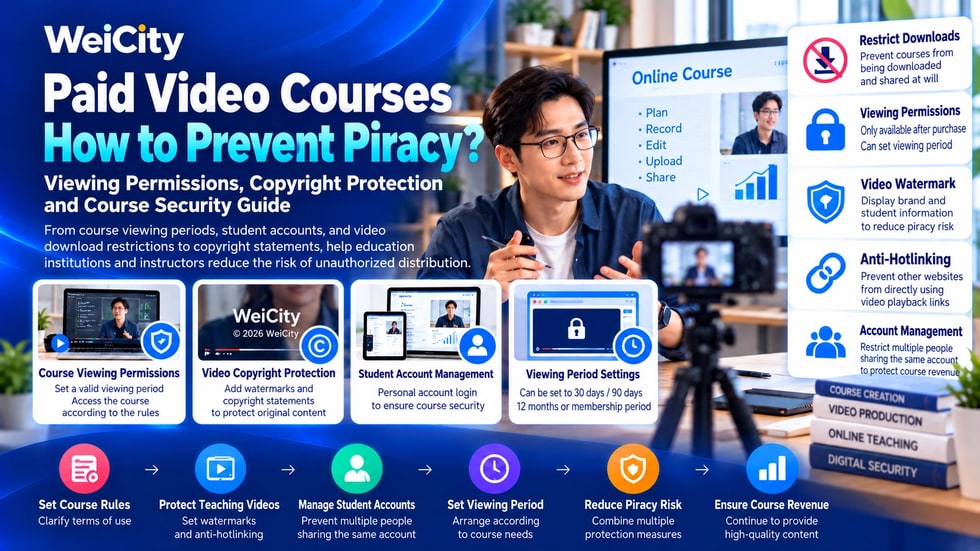
For education centers, training institutions, and professional instructors, producing a complete set of video courses often requires a significant investment of time and cost.
From planning teaching content, recording videos, and editing footage to preparing course materials and course descriptions, every step takes considerable effort.
However, once a course begins charging fees, merchants may face new problems.
🔸 A learner buys a course once but shares the videos with others.
🔸 Paid instructional videos are downloaded and spread on other websites.
🔸 Multiple people use the same account to watch a course.
🔸 Courses that were only meant to be viewable for three months are kept accessible for much longer.
🔸 Instructional videos are re-uploaded or impersonated by others.
🔸 Course materials are copied and sold without consent.
These problems may not only affect course revenue but also make copyright management and customer service more difficult.
Therefore, when operating paid video courses, in addition to focusing on teaching quality, merchants should also plan ahead for viewing permissions, copyright protection, and course delivery methods.
Free videos and paid courses usually serve different business purposes.
Public videos are mainly used for knowledge sharing, course promotion, or attracting potential learners.
Paid courses, by agreement, provide buyers with specific learning content or services.
For example:
📚 Complete math exam review course.
🗣️ Professional English speaking training.
💻 Advanced Excel application instruction.
🎨 Photoshop design course.
🍰 Professional baking instruction.
💼 Corporate training and business courses.
If a paid course is publicly distributed without authorization, it may cause:
❌ Loss of original course sales opportunities.
❌ Confusion between paying learners' and non-paying viewers' access rights.
❌ Instructors' teaching content being impersonated by others.
❌ Course versions being modified or incorrectly distributed.
❌ Merchants struggling to manage how their courses are used.
Therefore, merchants should establish protective measures that match their course business model.
However, please understand:
No general online video protection method can guarantee 100% prevention of copying or screen recording.
A reasonable goal is to reduce risk, manage legitimate access, and retain grounds for handling when infringement occurs.
Course Access Permission refers to the system determining, based on course rules, which users may view specified instructional content.
For example, a learner has purchased an Excel basics course.
The merchant may want this learner to be able to view the purchased course, but not automatically gain access to other paid courses.
Common permission arrangements include:
🔓 Public Access
Anyone who meets the access conditions can watch, suitable for free teaching demonstrations.
👤 Login-Required Access
Users must log in to a designated account to view related content.
💳 Post-Purchase Access
After the system confirms that the learner has a valid purchase, viewing of the corresponding course is allowed.
⏱️ Time-Limited Access
Learners can only watch within the agreed validity period.
🔄 Subscription Access
During the subscription validity period, learners can access designated courses according to membership rules.
These methods require the course system to have corresponding identity verification and permission management capabilities.
Merchants should choose based on their actual teaching services, rather than assuming all video platforms support them.
There is no uniform standard for course viewing periods that suits all merchants.
Different courses, based on their teaching content and business models, may require different arrangements.
For example:
📘 30-day viewing period: suitable for some short-term training or event courses.
📗 90-day viewing period: suitable for learning plans that need to be completed within a certain time.
📙 12-month viewing period: suitable for courses that require longer review time.
📕 Long-term viewing access: suitable for courses where the merchant is willing to provide continuous access.
🔄 Viewing during membership validity: suitable for subscription-based course services.
The above are only examples of common arrangements and are not a unified industry standard.
When setting a viewing period, it is recommended to consider:
✅ How long it takes to complete the course content.
✅ Whether learners need to practice repeatedly.
✅ Whether regular updates are included.
✅ Video hosting and operating costs.
✅ Whether the course involves knowledge that needs updating.
✅ Whether learners clearly understood the period before purchasing.
In particular, be aware that "lifetime access" may be understood by learners to mean there is no time limit.
If a merchant cannot guarantee long-term course service, it should not make such a promise casually.
Some paid courses may experience account-sharing problems.
For example, after purchasing a course, a learner shares the account username and password with others.
If the course business model only allows personal use, this may violate the purchase terms.
Merchants may consider the following management methods.
🔐 Use independent learner accounts.
📧 Register through verified email addresses.
📱 Set up multi-factor authentication as needed.
💻 Set reasonable limits on the number of simultaneous viewing sessions.
🔔 Conduct security checks on abnormal login activity.
📋 Clearly explain account usage and sharing rules.
However, it is not recommended to determine that a learner has violated the rules based solely on different IP addresses.
This is because the same user may switch between home, office, or mobile networks.
Account management measures should be reasonable and transparent, balancing the experience of legitimate learners with the protection of personal data.
No.
Some course systems allow merchants to restrict direct downloads of video files.
This feature can reduce the risk of certain unauthorized saving and distribution.
However, restricting downloads does not mean videos cannot be copied.
For example, users may still copy viewable footage through screen recording or other methods.
Therefore, video content protection usually requires combining multiple methods.
🔒 Restrict unauthorized direct access to video files.
🔗 Control the scope of use for course playback links.
👤 Manage viewing eligibility through account management.
⏱️ Restrict access periods according to course rules.
🛡️ Use professional video protection technologies as needed.
📋 Explain permitted and prohibited uses in the course terms.
For courses of high value or with greater copyright risk, you may further evaluate video services that support Digital Rights Management (DRM).
However, the effectiveness, cost, and compatibility of different protection technologies vary.
A Video Watermark is a way of displaying brand, copyright information, or other identifying content within the frame.
For example:
🏷️ Instructor name.
🏫 Name of the educational institution.
🌐 Merchant website or brand name.
©️ Copyright year and copyright owner information.
Some professional video services also support dynamic watermarks, such as markers linked to a viewing session displayed on the playback screen.
The functions of watermarks include:
✅ Showing the brand source of course content.
✅ Making it harder for others to impersonate videos.
✅ In some cases, helping trace the source of unauthorized distribution.
However, ordinary static watermarks may also be cropped, covered, or removed.
Therefore, watermarks are only a supplementary protective measure.
If dynamic watermarks related to learners are used, personal data protection and privacy risks should also be considered, avoiding unnecessary exposure of sensitive information.
Video Hotlink Protection (Hotlink Protection) is a technology used to restrict other websites from directly using specific video resources without permission.
For example, a training institution uses a professional video hosting service to provide paid courses.
If other websites can directly obtain and use video playback addresses, the original course introduction or access process may be bypassed.
Hotlink protection technology can restrict some unauthorized resource requests, depending on the actual capabilities of the service.
Common technologies include:
🔹 Restricted resource access rules.
🔹 Short-validity signed playback addresses.
🔹 Verified access tokens.
🔹 Specific domain or source restrictions.
🔹 Playback authorization linked to user identity.
However, the effectiveness of the technology depends on how it is actually implemented.
Simply hiding video links, disabling right-click on web pages, or only checking the domain source is not enough to guarantee the security of paid courses.
If merchants use third-party course platforms, they should first confirm what protection capabilities those platforms provide.
Yes, this should be considered.
A set of online video courses may include a variety of teaching materials.
For example:
📄 PDF course handouts.
📊 Excel practice files.
📽️ PowerPoint teaching slides.
📝 Quiz questions and answers.
🎨 Design templates.
📚 Other original teaching materials.
These materials may also involve copyright and licensing restrictions.
Based on their course business needs, merchants can:
✅ Clearly state which files are allowed to be downloaded.
✅ State whether the materials are for personal study only.
✅ Specify whether forwarding to others is allowed.
✅ Avoid publishing unauthorized third-party teaching materials.
✅ Keep records of original content and the sources of any licensed material.
At the same time, you should also respect the rights that learners enjoy under the law, as well as the uses permitted by applicable law.
If you produce and sell online video courses in Malaysia, you should understand the relevant intellectual property and personal data protection requirements.
In general, original teaching videos, handouts and other qualifying works may be protected under the Malaysian Copyright Act 1987.
However, not all teaching concepts, facts or methods themselves can receive the same copyright protection.
Merchants should pay attention to:
©️ Original content
Keep original recording files, course materials and creation records properly.
📸 Images and video materials
Confirm that third-party materials you use are properly licensed.
🎵 Background music
Do not assume that music being easy to find online means it can be freely used in a commercial course.
📚 Teaching materials and textbooks
When using other people's teaching materials, confirm the scope of use and the relevant permissions.
👤 Learner privacy
When recording courses, handle learners' images, names and personal data properly.
📝 Course terms of service
Clearly explain what usage rights buyers receive after purchase.
🔐 Account and payment information
Handle related data in accordance with applicable law and reasonable security standards.
Course copyright and personal data protection are different legal matters.
For specific disputes or business compliance needs, consult a person with relevant professional expertise.
For educational institutions and professional instructors, running paid courses involves not only viewing access but also helping prospective learners understand the course content and purchase conditions.
The WeiCity merchant channel can serve as a centralized entry point for displaying teaching services and course information.
🏪 Introduce the education institution
Showcase the background of training institutes, education centers or independent instructors.
📚 Explain course content
Introduce the course name, learning topics, suitable audience and main chapters.
🎬 Display course-related information
Use content features the platform actually supports to explain teaching highlights or publish public course introductions.
💰 Introduce pricing methods
Let customers understand the course prices, payment arrangements and related conditions offered by the merchant.
⏱️ Explain the viewing period
Merchants can tell learners in the course description the actual agreed period for using the course.
📱 Provide enquiry methods
Allow prospective learners to further inquire about purchase and enrollment arrangements.
🔗 Share the channel link in one place
Through social media and everyday promotion, help interested customers find the merchant's course introduction.
Please pay special attention:
The WeiCity merchant channel can display course information, but this does not mean the platform already provides automatic authorization for paid videos, DRM, hotlink protection or account viewing restrictions.
If you plan to sell paid video courses directly on WeiCity, you must first confirm the platform's actual support for course payment, video hosting, purchase verification, viewing permissions and content protection.
If a capability is not yet available, use another verified course delivery method instead, and do not promise customers security features that do not exist.
Many course disputes arise not because the teaching content is poor, but because buyer and seller understand the usage conditions differently.
For example:
❓ The learner assumes the course can be viewed for a long time.
❓ The merchant actually provides only 90 days of access.
❓ The learner assumes the teaching videos can be downloaded.
❓ The merchant allows only online playback.
❓ The learner assumes the fee includes the teacher's personal coaching.
❓ The merchant actually sells only pre-recorded videos.
To reduce misunderstandings, it is recommended to clearly explain the following before collecting payment:
✅ What teaching content the course includes.
✅ How the course can be viewed.
✅ Whether an account registration is required.
✅ The validity period of the course.
✅ Whether repeated viewing is allowed.
✅ Whether downloading teaching materials is allowed.
✅ Whether teacher guidance or after-sales service is provided.
✅ Refund and cancellation conditions for the course.
✅ How the course is delivered after payment.
✅ How to contact the merchant when technical problems occur.
The clearer the course rules, the easier it is for prospective learners to understand what they are buying.
If course access settings are too strict, they may also affect the experience of legitimate learners.
For example:
🔸 Learners cannot continue studying after changing their phone.
🔸 Learners are frequently asked to log in again because of network changes.
🔸 Video playback is restricted too much.
🔸 Learners cannot use necessary auxiliary learning functions.
🔸 Help cannot be obtained promptly when technical problems occur.
Therefore, merchants need to strike a balance between course protection and convenient use.
You may consider:
✅ Let legitimate learners log in easily.
✅ Provide a reasonable account recovery method.
✅ Use a stable video playback service that is compatible with common devices.
✅ Explain viewing restrictions in advance.
✅ Provide assistance for eligible technical issues.
✅ Avoid collecting unnecessary personal data.
✅ Make sure course terms match the actual service content.
Security measures should not become the main obstacle to learners' studies.
A good paid course does not only protect the merchant's knowledge content; it should also safeguard the learning experience of genuine buyers.
Beyond introducing the course itself, merchants can also publish helpful public articles that address common user questions.
For example:
🔍 How to Protect Online Courses
🔍 Video Course Copyright Protection
🔍 Copyright protection for paid video courses.
🔍 How to prevent piracy of online courses.
🔍 Video course viewing permission management.
🔍 Online Course Access Control.
🔍 Online course copyright in Malaysia.
These topics can help prospective customers understand online course operations and related knowledge.
Recommended article content includes:
📚 A clear explanation of the problem.
🔐 Common protection methods.
⚖️ Related risks and legal considerations.
👤 Basic concepts of learner access permissions.
📱 Course consultation and service information.
However, do not stuff keywords just to attract search traffic.
Nor should public course promotion reveal security configuration details that could easily be abused.
Content should focus mainly on helping real readers understand the issue.
Before officially launching a paid course, merchants can check each item one by one.
✅ Step 1: Confirm the copyright ownership of the course videos and materials.
✅ Step 2: Decide on the course sales model.
✅ Step 3: Clarify the viewing permissions buyers receive after purchase.
✅ Step 4: Decide whether to set a viewing validity period.
✅ Step 5: Choose a video hosting or course system that meets your needs.
✅ Step 6: Confirm whether appropriate account access controls are supported.
✅ Step 7: Evaluate watermarking, hotlink protection and other technical protections as needed.
✅ Step 8: Prepare clear course purchase and usage terms.
✅ Step 9: Plan refund, technical support and account recovery processes.
✅ Step 10: Test the purchase and viewing process with a test account.
✅ Step 11: Prepare public course introductions and related promotional materials.
✅ Step 12: Confirm that all features work properly before officially selling.
You do not need to adopt the most complex protection technology from the start.
What matters more is choosing suitable management measures based on the value of the course, the level of risk, the cost and learners' needs.
Producing paid video courses requires investment of time, knowledge and teaching experience.
Therefore, protecting original teaching content and managing course access rights is business work worth taking seriously.
But course protection cannot rely only on prohibiting downloads or adding watermarks.
Merchants also need to consider account management, access periods, copyright licensing, personal data security and learner service.
For educational institutions, training centers and independent instructors, clearly explaining course rules also helps reduce misunderstandings and build a more professional teaching image.
🌐 WeiCity | Help professional courses be discovered, and make it easier for learners in need to understand your teaching services.
🔐 Protect the value of knowledge starting from clear course rules, reasonable access management and responsible business practices.