

6 📣 How to Promote Your Merchant Channel? An Example of Promotion Planning for a New Product or Event
From preparing channel content to publishing promotion, so that when customers see the message, they can keep learning about products, events, and ways to contact you.
How can you use your WeiCity Merchant Channel to promote new products or events? Using new product promotion as an example, this article explains how to set goals, organize product information, prepare promotional content, share the channel link, and follow up on inquiries. Merchants can adjust the steps to fit their actual operations, so the channel becomes a gateway for customers to learn about products and contact the business.
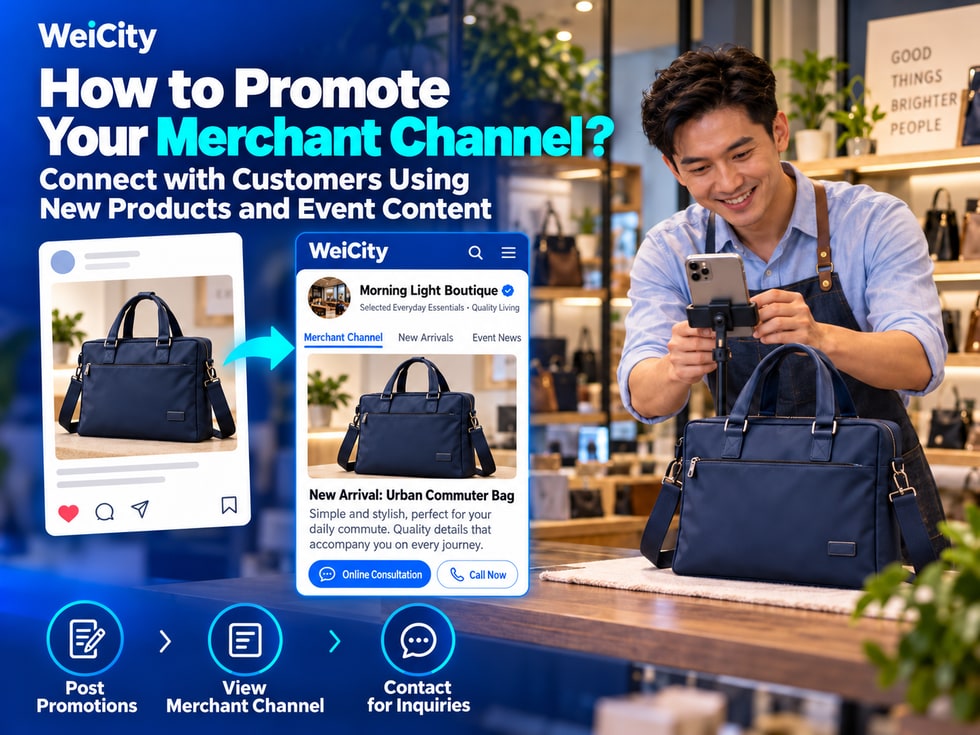
When a merchant launches a new product, holds an event, or adds a service, the merchant usually shares promotional messages through Facebook, Instagram, WhatsApp, or other channels.
However, after seeing a promotion, customers may want to learn more about:
🛍️ What sizes, colors, or styles are available?
💰 What is the price, and what does it include?
📅 When does the event start, and where is it held?
📦 How can the product be purchased, delivered, or collected?
💬 How should customers contact the merchant if they have questions?
If a promotion has only one image and a few lines of text, customers may still need to send private messages to ask about each item.
💡 Merchants can first organize complete product, service, or event information in their WeiCity merchant channel, then share the corresponding links through social media and other channels. This helps customers move from seeing a promotion to learning more and contacting the merchant.
The following example uses a shop promoting a new commuter bag to show how to arrange a complete online promotion.
The product names, prices, styles, and event arrangements in this article are examples only. When publishing, always use the merchant's actual information.
Before preparing a promotion, ask yourself:
“What do I want customers to do after seeing this promotion?”
Different promotions can have different goals.
You want customers to:
📸 View product photos.
📏 Understand sizes and specifications.
🎨 Compare different styles.
💬 Ask questions further or make a purchase.
You want customers to:
🔧 Learn about the service offerings.
📍 Confirm the service area.
🖼️ View related case examples.
📞 Contact the merchant for a quote.
You want customers to:
📅 Learn the event date.
📍 View the event location.
📋 Confirm the participation requirements.
💬 Ask how to register.
You want customers to:
🏪 Get to know the merchant.
📸 View the store environment.
🕒 Check the business hours.
📍 Navigate to the store.
The goal of this promotion can be set as:
“Let customers view the product information for the new commuter bag, learn about its size and design, and then contact the merchant through the channel.”
A single promotion can include several related pieces of information, but it is best to highlight one main action.
📌 First decide what the customer should do next, then decide how the promotional image, text, and link should be arranged.
A promotion can attract customers' attention, but once they enter the channel, they still need to find complete and accurate information.
For this reason, we recommend organizing your channel content before you start promoting.
🏷️ Product Name
Use a clear, easy-to-recognize name.
📸 Real Product Photos
Show the overall appearance and important details.
📏 Dimensions and specifications
State the actual dimensions, materials, and other important information.
🎨 Colors and styles
Let customers know what options are available.
📦 What's Included
Explain which accessories are actually included with the product.
💰 Pricing Information
Confirm the specifications, quantities, and conditions that correspond to each price.
🚚 Purchase and Delivery
Explain the purchase, pickup, or delivery arrangements.
💬 Contact Information
Let customers know how to make further inquiries.
📌 Event name and theme.
📅 Event Dates.
🕒 Opening and closing times.
📍 The event location.
👥 Who the event is suitable for.
💰 Fees and participation requirements.
📝 How to register or make a reservation.
📞 Contact information for inquiries.
For example:
❌ Supply dates that have not been confirmed.
❌ Discounted prices that are uncertain.
❌ Event spots that have not been secured.
❌ Delivery times that cannot be guaranteed.
❌ Service areas that have not been confirmed.
If information has not yet been finalized, state that it still needs to be confirmed.
📌 Promotional content and channel information should be consistent, so customers do not see different prices, specifications, or event conditions.
Not every promotion needs to direct customers to the merchant channel homepage.
Based on the theme of the promotion, choose the most relevant content entry point.
We recommend sharing the corresponding product or related information page.
For example:
New Commuter Bag Model A | Product Introduction
Let customers view photos, dimensions, colors, and purchase information.
We recommend sharing content that includes complete event information.
For example:
Weekend New Product Showcase | Time, Location, and How to Participate
Let customers learn about the event schedule.
We recommend sharing the corresponding service introduction.
For example:
Residential Plumbing and Electrical Repair | Service Scope and Quote Guide
Let customers confirm the service content and how to make inquiries.
You can share the merchant channel entry point.
For example:
Get to Know Our Brand | Products, Services, and Contact Information
Help customers who are meeting the merchant for the first time learn more.
✅ Whether the link is correct.
✅ Whether it opens the corresponding content.
✅ Whether customers who are not logged in can browse the public information normally.
✅ Whether the images and text are complete.
✅ Whether the display on mobile is normal.
The specific pages and features that can be shared should be based on the content WeiCity currently makes available.
📌 Share content that is most relevant to the topic of your promotion, so customers spend less time searching for information after they open the page.
For a new product promotion, you can prepare different materials around the same theme.
Not every image needs to include all the information.
The main promotional image helps customers quickly understand what is being introduced.
For example:
NEW ARRIVAL
New Commuter Bag Series
Learn about the styles and product details
The image can highlight the product itself and avoid including too much text.
Show what customers care about.
For example:
🎒 Overall appearance of the bag.
💻 Laptop storage compartment.
🧵 Material and stitching.
🔒 Zippers and internal structure.
🎨 Styles in different colors.
If possible, film a simple short video.
For example:
📦 Open the bag to show the interior space.
💻 Demonstrate placing a device that fits the dimensions.
🎒 Show how the bag actually looks when worn.
🔍 Film important details up close.
The short video should present the product truthfully and must not mislead customers for promotional purposes.
The text can explain:
🏷️ What is being introduced.
✨ Notable features worth learning about.
📏 Where to view the full specifications.
💬 How to make further inquiries.
Lets customers continue viewing complete information.
📌 The main image draws attention, detail materials help with understanding, and channel content provides more complete information.
Merchant promotions do not necessarily need complicated advertising wording.
You can use a simple structure:
What is being introduced → What is worth knowing → What customers can do next
🎒 New commuter bag, making everyday storage more organized!
Looking for a commuter bag for work, school, or everyday outings?
We have organized product introductions for the new commuter bag to help you learn about the different styles and practical designs.
📸 View the product's appearance and details.
📏 Check the size and storage space.
🎨 Compare the available colors and styles.
💬 If you have questions, you can contact the merchant for more information.
👉 View the full product information:
〔Insert the corresponding WeiCity product or channel link〕
🔧 Need residential repair services? First learn about the service scope and how to request a quote.
If your home has a problem that needs repair, you can first review our service introduction.
🛠️ Learn about the repair services offered.
📍 Confirm the service area.
📸 View related case examples.
📝 Learn what information to prepare before requesting a quote.
👉 View the service introduction:
〔Insert the corresponding WeiCity content link〕
🎉 A weekend event is coming up!
Want to know the event time, location, and how to participate?
We have organized the related event information so you can review it in advance.
📅 Event date and time.
📍 The event location.
📋 Participation requirements.
💬 How to inquire and register.
👉 View event details:
〔Insert the corresponding WeiCity content link〕
All of the above are copy examples only. When publishing, modify them based on the actual product, service, or event.
📌 Promotional copy does not need to include every detail, but it should tell customers where to find the complete information.
After completing your channel information and promotional materials, you can share them using the methods each platform currently supports.
Can be used to:
🆕 New product introductions.
🎉 Event promotions.
🛍️ Product display.
🏪 Brand introduction.
When sharing, you can include the relevant channel link in the post so customers can continue viewing the information.
You can do this through:
🖼️ Product photos.
🎬 Reels short videos.
📱 Stories.
🔗 The link entry in the profile bio.
The specific link placement and available options depend on Instagram's current features.
You can use short videos to show:
🎒 How the product is used.
🛠️ The service process.
🏪 Store environment.
🎉 Event preparations.
Then, based on the methods your account currently supports, guide customers to view related links or contact information.
Suitable for handling inquiries from existing customers.
For example:
“Here you can find photos, dimensions, and styles of the new commuter bag so you can review them first.”
Then attach the corresponding link.
You can use the channel link for:
📧 Email signatures.
📋 Company introductions.
💼 Quotation information.
📝 Product or service descriptions.
You can also use the channel URL or a QR code for:
💳 Business cards.
📦 Product packaging.
🏪 In-store displays.
📄 Promotional flyers.
✅ After scanning, check whether the correct page opens.
✅ Check whether the link is still valid.
✅ Check whether it loads properly on a phone.
✅ Check whether the page information is accurate.
📌 Different channels can use different promotional formats, but try to guide customers to accurate and relevant content.
Promotion does not have to be a single post.
You can add different information in stages, depending on the situation.
Complete the following first:
📸 Product photos.
📏 Sizes and specifications.
💰 Prices and terms.
🔗 Channel link.
💬 Customer enquiry arrangements.
Once the information is confirmed as accurate, officially publish.
Focus on introducing the new product.
For example:
🎒 The new commuter bag is now officially available
Let customers know:
🆕 What the new product is.
✨ Its main features.
🔗 Where to view the full information.
You can publish a second post:
💻 How is the interior space of the commuter bag arranged?
Showcases:
📸 Laptop compartment.
📦 Storage positions.
🔒 Zipper structure.
📏 Relevant dimensions.
You can publish a third post:
📏 Before buying a commuter bag, how do you confirm the laptop size?
Explanation:
💻 Actual size of the device.
📐 Storage space.
🎒 Points to note when choosing.
If a product sells out, is restocked or its conditions change, update the relevant information promptly.
📌 Each promotion should offer one new useful piece of information; this helps customers understand more deeply than repeating the same advertisement over and over.
After a promotion is published, customers may contact the merchant by phone, WhatsApp or other means.
Therefore, arrange internal work before promoting.
👤 Who will respond?
Clearly assign the people responsible for receiving enquiries.
🛍️ Who confirms product information?
Make sure prices, specifications and stock information are accurate.
📦 Who handles purchase arrangements?
Confirm the purchase, pickup or delivery process.
💬 What do customers need to provide?
For example, style, quantity, area or appointment date.
🔄 Who updates information when it changes?
For example, stock shortages, changes in event places or service adjustments.
Customer:
"Does this commuter bag come in black?"
Merchant:
"Are you asking about Style A? Please send a product screenshot or the style name so we can confirm the colours currently available."
After confirming, then provide the corresponding information.
If customers need more detailed information, you can also share the product description in the channel.
📌 Arranging the enquiry process before promotion helps customers receive clearer and more consistent replies.
After a promotion is published, do not look only at how many people liked it.
Also observe whether customers actually explore the content further.
For example:
📱 Post views.
🎬 Video views.
❤️ Likes and interactions.
This data shows how much attention the promotional content received.
For example:
🌐 How many people opened the related pages.
🛍️ Which product content received attention.
📝 Which descriptions were viewed.
This data depends on statistical tools that are actually available.
For example:
📞 How many people called.
💬 How many people asked via WhatsApp.
📏 Which specifications customers ask about most often.
📍 Whether customers can easily find the address.
For example:
📦 Product orders.
📅 Service bookings.
🏪 In-store enquiries.
💰 Actual transactions.
Views do not equal enquiries.
Enquiries do not equal sales.
The number of likes cannot directly represent sales results either.
If there are no relevant statistical tools, staff can keep simple records of:
📝 Where customers saw the promotion.
💬 What customers ask most often.
🛍️ Which product customers ask about.
📋 Which information is still unclear.
📌 The effect of a promotion is not only how many people see it, but also whether customers can continue to learn more and take the next step.
After a promotion, if different customers repeatedly ask the same question, check whether the channel information needs to be supplemented.
You can add:
📐 Product dimensions.
📸 Dimension diagram photos.
📝 Specification notes.
You can add:
🖼️ Photos of different colours.
🏷️ Style names.
📦 Current supply status.
You can check:
🏪 Storefront photos.
📍 Map location.
🕒 Opening hours.
🚪 Entrance directions.
You can add:
📦 What is actually included.
📝 Purchase conditions.
💳 Fees that need to be confirmed separately.
You can check:
📞 Contact number.
💬 WhatsApp entry point.
📝 Enquiry guidance.
🔗 Whether the promotion links are correct.
📌 Customers' actual questions can help merchants identify where promotions and channel content need improvement.
After a new product sells out, an event ends or purchase conditions change, old promotions may still be seen by customers.
For example:
📱 Customers arriving from an old Facebook post.
🔗 Friends forwarding earlier product links.
📦 Customers scanning QR codes on old packaging.
💬 Customers reopening WhatsApp links received in the past.
Therefore, merchants need to check old content regularly.
📦 Product status
Is it still in supply?
💰 Prices and conditions
Have they changed?
📅 Event dates
Have they ended?
📍 Location information
Are they still correct?
📝 Product descriptions
Do they match the current version?
💬 Contact entry points
Do they still work properly?
If they still have reference value, indicate the status in an appropriate place.
For example:
This product is currently sold out. Please contact the merchant to confirm future supply.
Depending on the purpose of the content, update the event status or adjust how it is displayed.
For example:
This event has ended. Welcome to check the latest updates in the merchant channel.
Specific editing and display methods should follow the features currently supported by the platform.
📌 Keeping old links pointing to accurate information can reduce customer misunderstandings caused by outdated promotions.
For local merchants, social media, WhatsApp, short videos and physical promotions can all help customers reach them.
However, after seeing a promotion, customers often need more information before deciding whether it suits them.
The WeiCity Merchant Channel can serve as a centralised online entry point for related content.
🎯 Step 1: Define the promotion goal
Clarify what you want customers to learn and what they should do next.
📋 Step 2: Organise channel information
Prepare complete and accurate descriptions of products, services or events.
📸 Step 3: Create promotional materials
Use real photos, short videos and brief text to introduce the key points.
🔗 Step 4: Share the corresponding link
Let customers go from the promotion to the relevant channel content.
💬 Step 5: Follow up on customer enquiries
Provide corresponding information and next steps based on customer questions.
📊 Step 6: Observe actual feedback
Understand what customers care about most and which content needs improvement.
🔄 Step 7: Keep Updating
Adjust information based on changes in supply, events and business operations.
A merchant's promotion can first attract customers' attention.
But whether customers can find complete information, understand your products and services, and know how to contact you is just as important.
For example:
📱 Facebook post: Introduce the new commuter bag.
🔗 WeiCity product content: Show complete photos, specifications and purchase details.
💬 Merchant contact details: Help customers ask further about the styles that suit them.
In this way, your promotional messages and channel content can work together.
📣 Organize your content first, then share it with customers, so that every new product, service or event promotion has clear information for people to keep looking through.
🌐 WeiCity | Helping merchants connect promotional messages to complete product and service content, supporting customers from seeing a promotion and learning the details, to further contact and taking action.
👉 Learn about the WeiCity Merchant Channel: https://wei.city